Odoo 17 is just around the corner as the latest upcoming version of Odoo, one of the world's largest open-source Enterprise ERP systems. With Odoo Experience 2023 in sight, between November 8 and 10, 2023, we can expect Odoo CEO Fabien Pinckaers to make major announcements.
With this in mind, we expect that Odoo 17 will be available on November 8, 2023, with Odoo Experience playing an important role in this process.
Although changes can sometimes seem drastic, Odoo appears to be well-structured and focused on new features aimed at increasing relevance when it comes to saving time, efficiency, and productivity for users within your organization.
As in previous years, Odoo 17 feels like a crucial moment, with Odoo growing even further. Improved performance, accessibility, data analysis, and management bring Odoo even deeper into broader markets.
In this blog, we highlight the main points. Besides these new possibilities, many more improvements have been implemented, which you can find in the official release notes of Odoo 17.
Odoo 17 - New interface
Odoo comes with a large-scale redesign that brings significant improvements in both ease of use and visual appeal. Under the codename 'Milk,' this project primarily aims to strengthen the overall user experience and provide a visually appealing interface that promotes intuitive interaction.
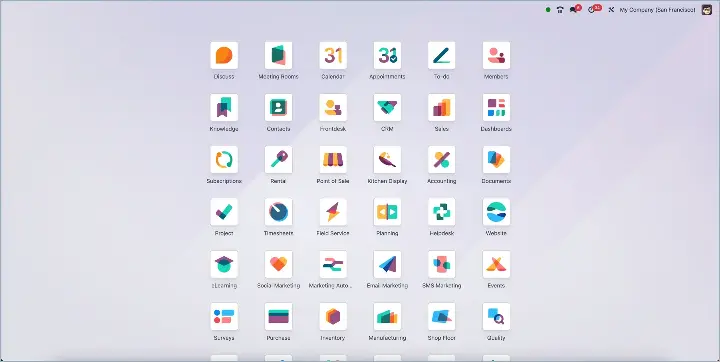 Default view Odoo 17
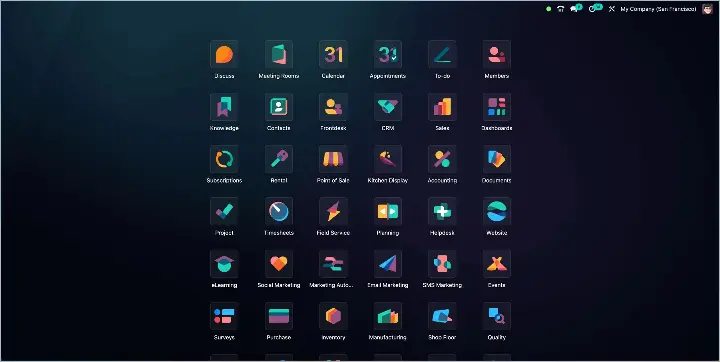 Dark mode view Odoo 17
It is not only a radically new design, but many improvements have also been made that further enhance user convenience.
Renewed portal
Not only has the backend interface been completely changed. Odoo 17 also has a completely new portal.
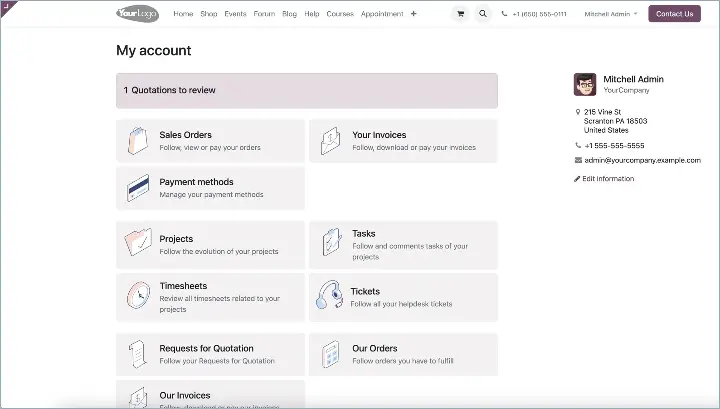
New portal layout
Change app order
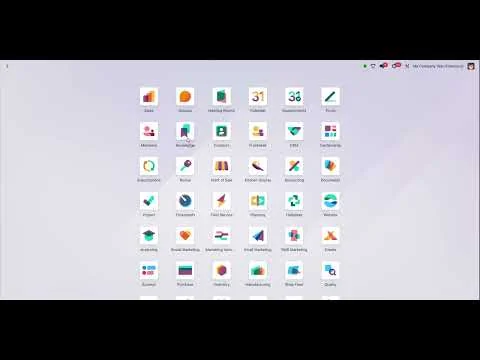
You can now arrange the Odoo App Icons yourself in the order you prefer.
Search, filter, and group the way you want
With Odoo 17, search views are getting a refresh, as their location has been moved to the center of the device screen. In addition, extra functionality has been added, making it much easier to combine specific terms such as 'Filter,' 'Group By,' and 'Favorites,' all merged into a convenient 'Search' tab. The goal is to make searching more accessible and easier for users.
Adding goods to the sales order is now also possible from the catalog. Here we are talking about Kanban. Thanks in large part to the updated catalog view, you can choose goods, edit the exact quantity, and even adjust sales orders in real time.
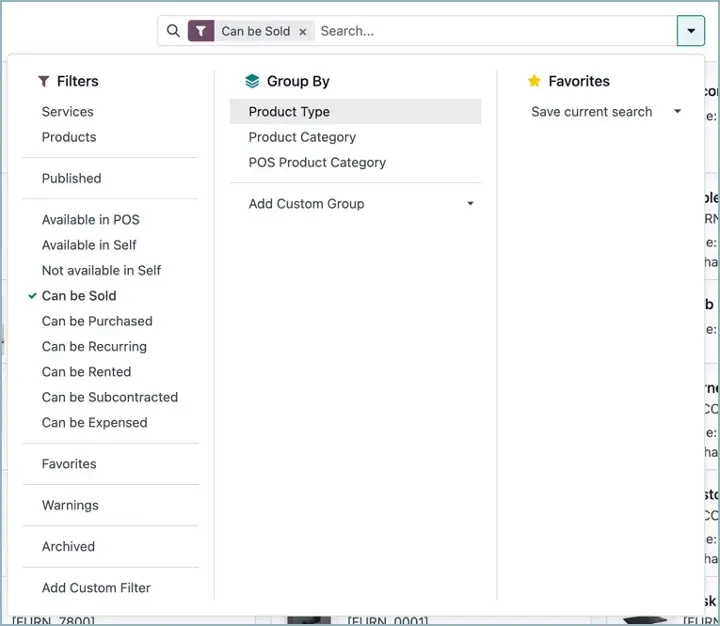
New search, filter, and grouping options
Top row of screen now fixed
The top row in both the list and Kanban view now remains fixed while you scroll down.
Web Push Notifications
Support for browser-based Web Push Notifications. 🔔 A major step toward consistency in user experience across different operating systems.
How long something remains in a stage
Track how long a document has remained in each stage of the progress bar.⏱
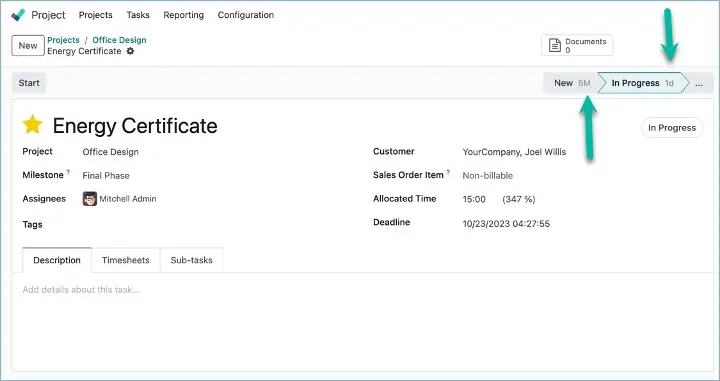
Odoo Stages with duration
Translating chatter messages
Users can add their Google Cloud Translation API Key in the settings to enable the translation feature for chat messages.
AI is coming to Odoo!
You can now request sample or alternative texts from Odoo by using ChatGPT.
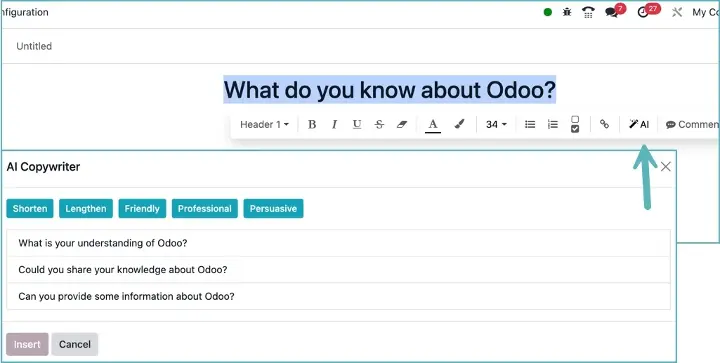
Odoo AI Feature
Manage your own email templates
Users can now manage their own templates. Previously, all email templates were shared, which created a cluttered user interface. With the new update, each user has the ability to create, edit, and save personal templates. Access to these templates is obtained through the email input pop-up, where users can only see and use their own templates, alongside templates that belong to no one.
New Apps in Odoo 17
Odoo Room Booking
Time is an indispensable currency in business, and the way organizations manage their meeting rooms can be a determining factor in their daily success. The launch of the 'Room Management' module in Odoo 17 marks a new era for efficient space management, allowing companies to manage their meeting rooms with a level of ease and precision that was previously unattainable. Read the blog Book your meeting rooms now with Odoo 17
Odoo To-Do List
Odoo 17 has a To-Do List App. It is truly a game changer for your daily workflow. Those paper to-do lists can go in the trash, because with this app you can organize all your tasks effortlessly and efficiently.
This app is not just a place to jot down your tasks; it is a powerful tool that helps you set priorities, keep an eye on deadlines, and track project progress. Everything you need, neatly presented in a clear interface.
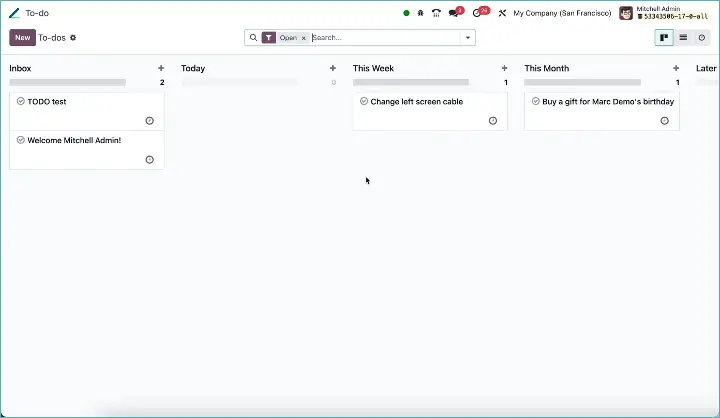
Odoo To-Do List
Odoo WhatsApp integration
Odoo 17 has introduced an exciting new feature: the integration of WhatsApp as a messaging tool. Given the widespread use of WhatsApp in many countries and companies, this integration is an essential step to keep up with current communication methods.
Also read the more detailed blog: Odoo introduces an integration with WhatsApp
Odoo visitor registration system
Discover the future of hospitality with Odoo's visitor registration system.
In today's fast-paced business world, managing visitor flows within your organization with the Odoo 17 Frontdesk module can make a world of difference. This system not only offers a seamless check-in experience, complete with digital logs and real-time updates, but also enriches the guest experience with a personal touch. From QR code check-ins to pre-registered 'Quick Sign-ins,' Odoo's visitor registration system is here to take your visitor management to a new level of professionalism and efficiency.
Also read the more detailed blog: How a visitor registration system can transform the guest experience-265
Odoo restaurant
Dive into the world of modern hospitality technology with the latest restaurant functionalities of Odoo 17. From efficient order management and tracking to innovative combo menus and direct online table reservations, Odoo is revolutionizing your restaurant management. Read the blog Explore the new restaurant functionalities in Odoo 17 for detailed information.
Odoo Shop Floor Control
Step into the future of production management with Odoo 17's brand-new Manufacturing Execution System (MES). Discover a new level of efficiency and precision on the shop floor with a system designed to simplify the complexity of modern manufacturing processes. From seamless integration to smarter tracking, discover how MES is changing the rules of the game and transforming your production capabilities. Are you ready to unlock the power of advanced manufacturing automation?
Read on to see what Odoo 17 has in store for you. Our blog about this improvement is coming soon.
Odoo 17 - General improvements
The launch of Odoo 17 brings a range of innovations and improvements that take the user experience and functional capabilities to the next level. Here are some highlights of the general improvements.
Multi-Company emailing with your own domain
If you work with multiple companies in 1 database (so-called Multi Company), emailing was limited to one domain. Every company had to operate under the same brand name and use the same email domain. In Odoo 17, this has (finally) been dropped and you can create your own email domain and email settings per company.
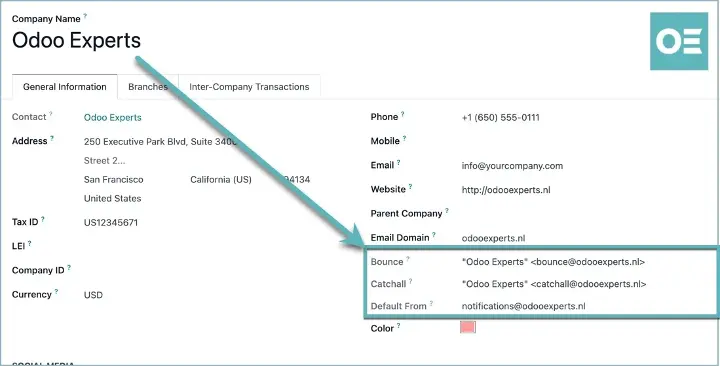
Odoo 17 email domain per company
Use of attributes
The use of attributes has been further expanded. You can now group attributes and, for example, also add them to lots/serial numbers.
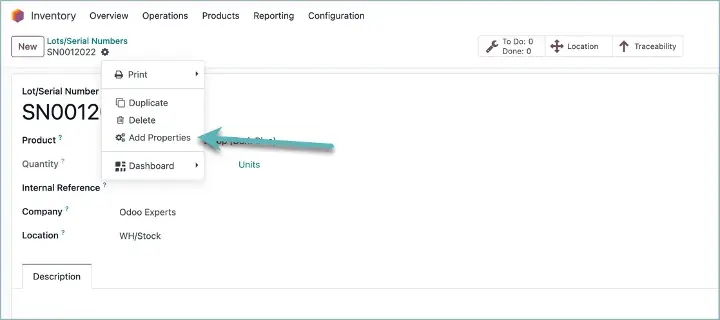
Use of attributes
 Odoo 17 - Appointments App
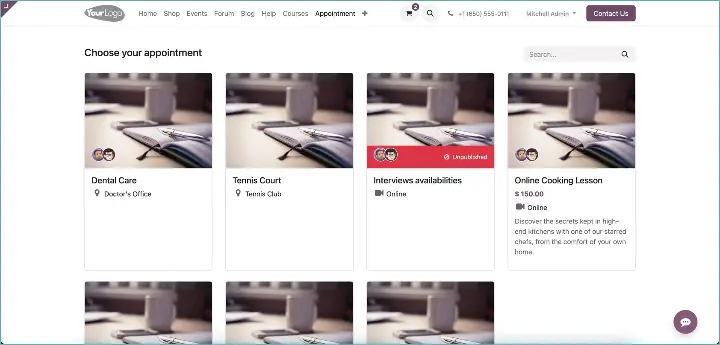
With every new version of Odoo come exciting improvements and features, and version 17 is no exception, especially when it comes to the Appointments app. This powerful piece of software has had a makeover that makes scheduling and managing appointments much more versatile.
A notable new feature is the ability to request advance payments . This provides more security and streamlines the financial process for services that must be paid in advance. It is a simple but effective way to reduce no-shows and improve cash flow.
The flexibility of Odoo 17 is further emphasized by the expansion of the types of appointments you can schedule. You are no longer limited to personal appointments; now you can also book resources, such as a tennis court or a dentist's chair. This opens up a world of possibilities for all kinds of businesses, from sports facilities to healthcare clinics.
But the Appointments app is also further integrated with the Restaurant POS. Assign tables to customers automatically based on capacity.
modern business naturally also includes the possibility of meeting online. In Odoo 17, you can add Google Meet links to your invitations. Although there is not yet support for Microsoft Teams, this is still a major step forward for companies that rely on Google's infrastructure.
Another element worth mentioning is the new Manage Capacity feature. This addition is particularly useful for managing the maximum number of participants for events or appointments. Whether you are organizing a yoga class, a workshop, or a corporate seminar, you can easily keep track of the number of registrations and make sure you do not overbook.
These improvements in Odoo 17's Appointments app are more than just incremental updates; they are a transformation in how businesses manage their time and resources. It is a clear signal that Odoo continues to adapt to the dynamic needs of modern enterprises.
 Odoo 17 - Knowledge App
In Odoo 17, the Knowledge app has been expanded with smart new features that help you manage and share knowledge more efficiently than ever.
New management features: With one-click actions, you can now restore articles or send them to the trash, making organizing your content child's play.
Interactive content: Add videos to your articles for a richer learning experience and keep users engaged without requiring them to leave your platform.
Ease of use for users: Portal users now have the power to edit content and create private articles, making knowledge sharing more democratic.
Improved organization: A Kanban board with stages helps you structure and prioritize articles.
Custom visibility: Choose who sees what with settings for general or restricted visibility, keeping your database organized.
Templates & History: Enrich your library with practical templates and easily track revisions with the new article history feature.
 Odoo 17 - CRM App
When managing your leads within Odoo's CRM, it is essential to be able to quickly and effectively view the status of scheduled meetings. With the latest update, Odoo has introduced a subtle but impactful change that changes the way you view your meetings.
Appointment display
Instead of a counter showing how many appointments are linked to a lead, you now get directly visible information:
- For an upcoming appointment: The start date is displayed with the text "Next appointment" next to it.
- If the appointment has already taken place: You see the date of the last meeting with "Last appointment".
- No appointment scheduled? Then no date is visible and it simply says "No appointment".
- For new leads: The button is hidden until an appointment has actually been scheduled.
 Odoo - Sales App
Sending standard documents
Easily sharing product documents with customers is now possible. Link your documents to your product and determine when you want to include them. Think of assembly instructions, certifications, nutrition labels, size/fit guides, specifications, references, test results, user manuals, and much more.
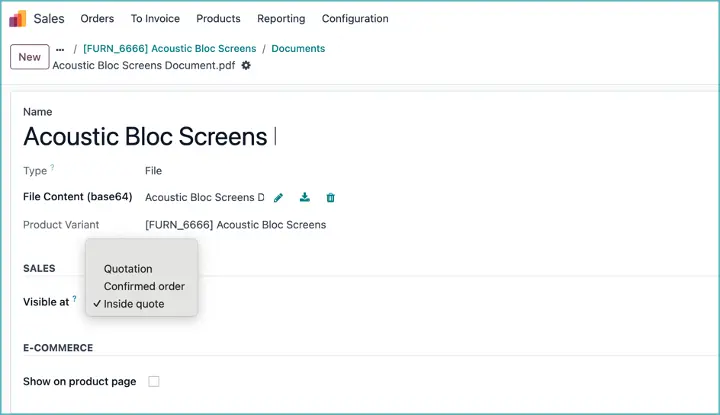
Odoo 17 link documents to product
New quotation layout
In Odoo Sales, the PDF Quote Generator offers the possibility to send customers a fully personalized PDF quotation that not only shows the price and total, but also highlights the company and the products in a visually appealing way, with various informative and design elements.
The tool combines headers and footers, product descriptions, and pricing information into a comprehensive quotation. In addition, there is the option to add dynamic texts, allowing the quotation to be tailored specifically to the customer.
A customized pdf increases the completion of the purchasing process for customers and adds an elegant level of professionalism to a company's image.
See the official quotation layout documentation
Adding a discount to a sales order
Odoo 17 introduces a new feature for sales orders: a handy wizard that offers users a choice of three different discount options:
- A proportional discount applied to individual sales order lines
- An overall discount on the total amount of the sales order
- A fixed discount amount for the entire order
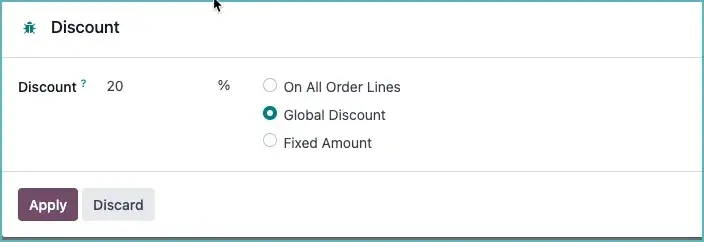
discount to a sales order
Ordering via catalog
Before this update, adding products to a sales order was a time-consuming process, where each product had to be added separately, followed by repeatedly clicking 'Add Product'. For large sales orders, this quickly became cumbersome.
After this update, the new 'Add from Catalog' action makes it possible to add multiple products from the catalog to the sales order at once. This significantly simplifies sales order management.
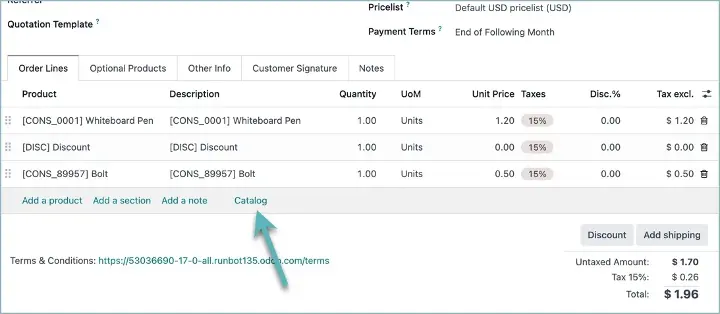
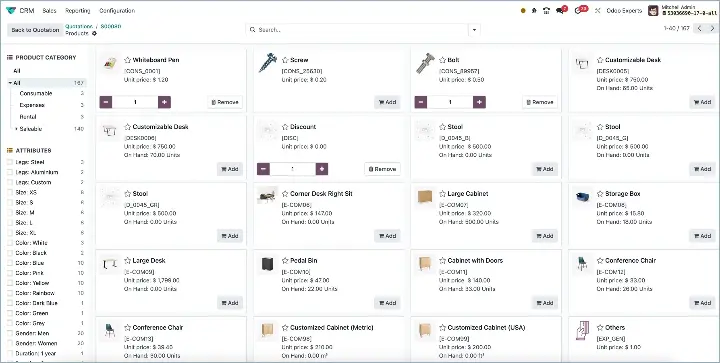
Order via catalog
Sales order down payment
You can now enter a down payment percentage that the customer must pay first before the customer can confirm the online quotation.
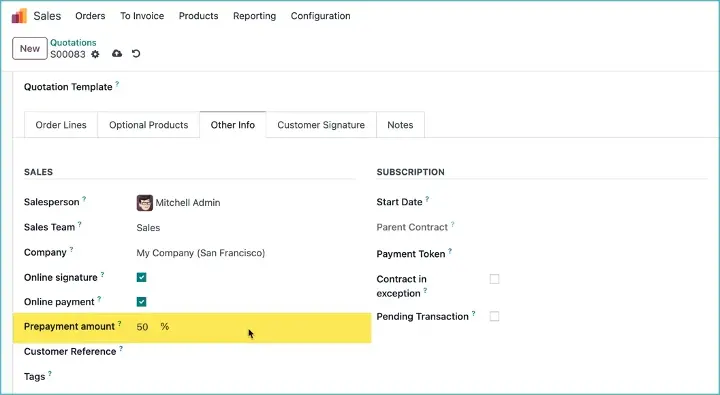
Odoo Sales Order down payment
Chatter on pricelists
A chatter has now also been added to pricelists, so you can communicate with colleagues about the pricelist, record information and build up history.
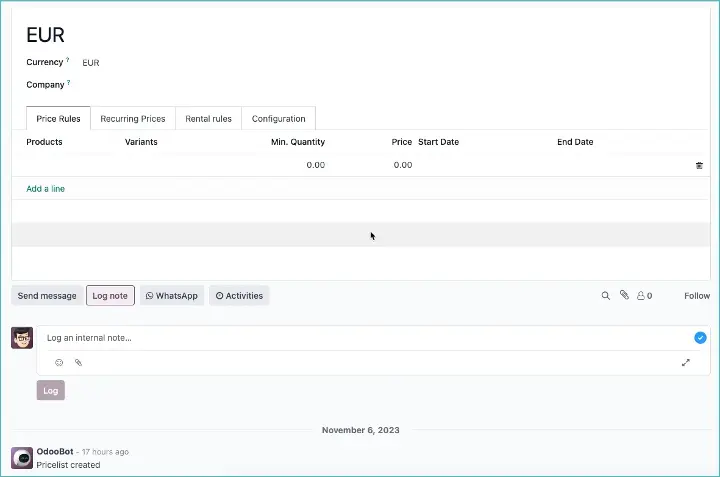
Chatter on pricelists
 Odoo 17 - Purchase App
Discount management
Odoo has improved the purchasing process with the introduction of discount management for vendor pricelists and purchase order lines. Here are the improvements:
- Odoo has added discount fields to both the vendor pricelist and the purchase order lines. These fields are optional and remain hidden by default to keep the interface clear.
- The discount field on a purchase order line is automatically filled in when the corresponding unit price comes from the vendor pricelist. This way, negotiated discounts are directly applied to the purchase order.
- The logic has been adjusted to apply discounts to the price excluding VAT, resulting in a more accurate cost calculation.
- When confirming the purchase order, Odoo checks whether a pricelist for the vendor already exists. If it does not, a new one is automatically created, including the discount.
Order via catalog
Just like in the Sales app, you can now also order via the catalog in purchase orders.
 Odoo 17 - Inventory App
Barcode App
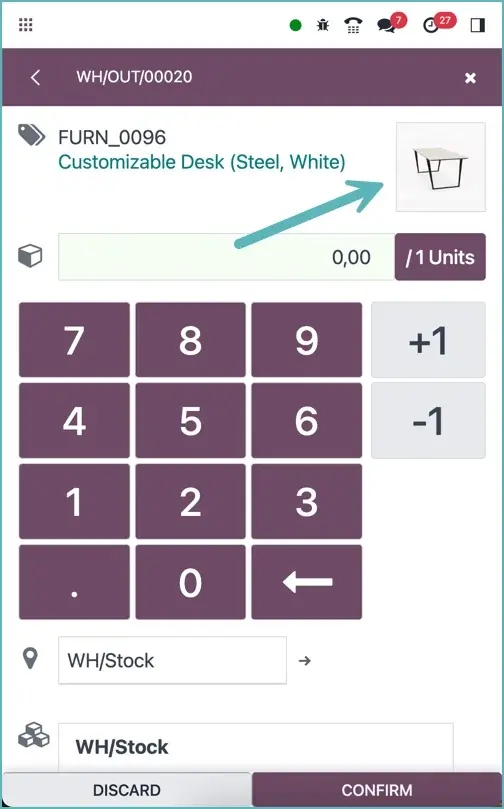
Odoo warehouse barcode app
- The option to enter a barcode manually has been added.
- A sound is played if a barcode is not recognized or is incorrect. The screen flashes as soon as a barcode is correctly identified.
- Scanning production orders has been added.
- The product image has been added to the scanning screen.
- Create a repair order directly from a return in the warehouse.
New picking strategy
Introduce a new strategy for collecting products: "Least Packages". The goal of this strategy is to take specific quantities of products from stock using as few packages as possible, enabling efficient logistics operations and preventing unnecessary opening/unpacking of packages.
The strategy works as follows:
- If a negative quantity is requested, this strategy will behave like a FIFO strategy (First In, First Out).
- In other cases, the strategy will determine a combination that reaches the requested quantity with the fewest packages, and will adjust the search domain so that only the quantities in these specific packages are selected. This way, no packages need to be opened.
- If it is not possible to find an exact package match for the requested quantity, the largest packages are selected one by one until the requested quantity is reached or until no more quantities are available. With this approach, one package must be opened because it is not used completely. The package ultimately chosen to open will be the smallest possible one, favoring the opening of smaller packages over larger ones.
- Loose items (not linked to a package) are considered packages with one item for the selection of packages.
To allow the selection strategy to "clean up" certain packages that have already been opened, it is recommended to unpack these packages into loose items, since they will then be used to supplement requested quantities in later pickings.
Automatically print documents and labels
Odoo has introduced a new feature that gives users the ability to have specific documents printed automatically at different moments within the logistics process.
In addition, the templates for product labels have been split into separate reports to make user customizations easier, for example with Odoo Studio. This offers more flexibility and customization options for handling documents and labels within the operational process.
By default, Odoo opens a PDF preview. If you want to print directly, install the IoT app on a computer that is on the same local network as the barcode app and configure the routing of the reports.
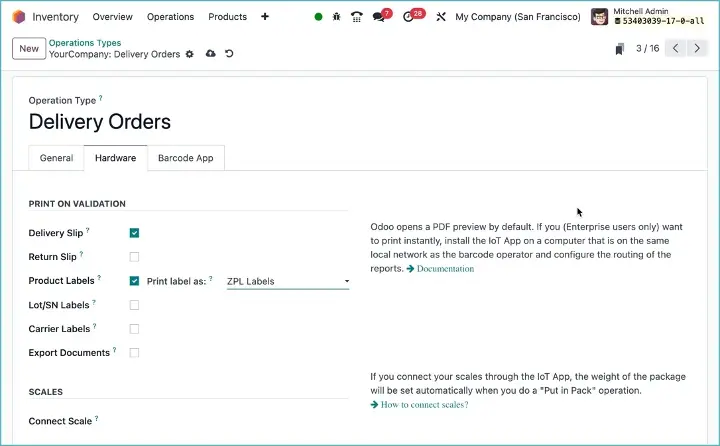
Automatically print documents and labels
Link routes to shipping methods
Odoo offers many possibilities for creating replenishment routes and logistics routes. You can now also make these routes depend on the shipping method and carrier.
 Odoo 17 - Documents App
In Odoo 17, improvements have been made to the Documents app, allowing you to manage all fleet documents in one central place. In addition, the app now offers the option to configure the retention period of deleted documents in the trash.
 Odoo 17 - E-commerce App
Labels linked to the product can now also optionally be displayed on the product page of your webshop.
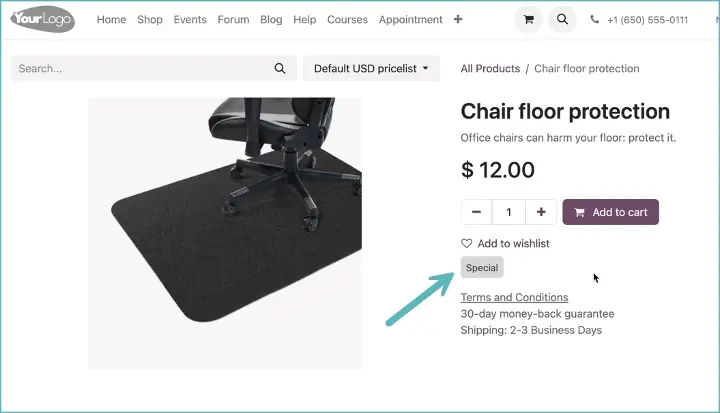
Add labels to product page
A new variant option has been added, allowing you to select multiple options at once.
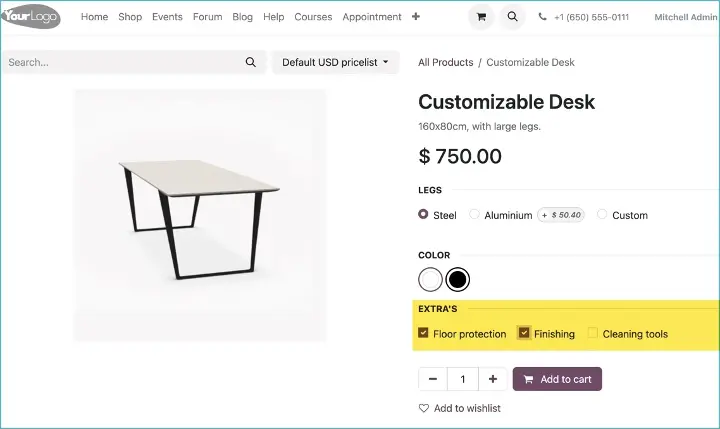
Multiple choices for variants
 Odoo 17 - POS App
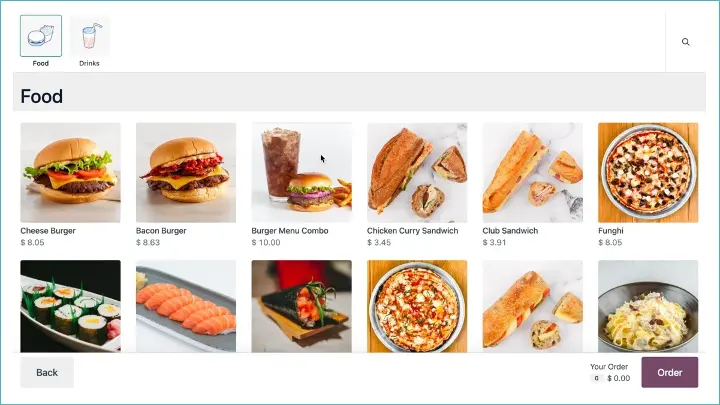
Odoo Self-service screen
Odoo 17 introduces several new features for the point of sale (POS) system that improve ease of use and flexibility:
- Self-service:
- Allows customers to place their own orders via large touchscreen totems without the intervention of a waiter.
- Payments can be made via Adyen or at the counter.
- At the end of the order, users receive an order number and, if applicable, their table number.
- Multi-checkbox attribute type for extra options:
- New attribute type introduced for extra options on products that can be selected via checkboxes.
- Each selected option adds an extra price to the product and appears on receipts and invoices.
- Improvements in combo products:
- Products linked to combos are now available in POS by default.
- Products associated with combos cannot be disabled in the POS.
- Backend logic and back-office views have been added for creating product combinations.
- WhatsApp Integration:
- Ability to send receipts via WhatsApp.
- Print receipt before payment:
- Option to print a receipt before the payment is completed.
 Odoo 17 - Accounting App
Discount is posted separately
Odoo has now introduced the possibility for users to set default accounts for discount allocation. When these accounts are specified (the account is optional), discounts on customer invoices and vendor bills will be allocated to the specified account instead of the product account.
For example, when creating an entry for a product with the following properties:
- Quantity: 1
- Unit price: 100
- Discount: 5%
The following entry is created:
Without a configured account for discount allocation:
Account Debit Credit
Revenue 0 95
Receivables 95 0
With a configured account for discount allocation to "Discounts Granted":
Account Debit Credit
Revenue 0 95
Discounts granted 5 0
Receivables 95 0
Subsidiary management
Subsidiary management offers the possibility to share data between parent and subsidiary companies, including:
- Accounts
- Taxes
- Fiscal positions
- Products
- ...and some related models
This data can be read and used by the subsidiaries.
This makes it possible to:
- Use different brands for different business activities.
- Apply more complex security rules.
- Consolidate branches in different ways.
- Manage different tax reports with different tax rules in the same country.
Delivery date on invoice
The delivery date of an order is now shown on the invoice and on the printed invoice.
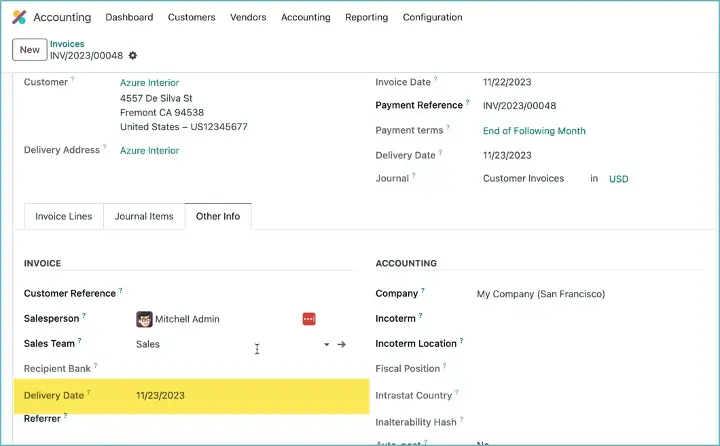
Delivery date on invoice
 Odoo 17 E-sign App
Link multiple signature requests together in Odoo Sign. Increase the chance of collecting all pending signatures faster.
Keep track of documents waiting for your signature with the new reminder feature.
 Odoo 17 - Manufacturing App
Odoo has added a new production cost account that can be assigned to locations of the type 'Production'. When products move into or out of a production location, the accounting entry is now posted to this new account instead of the former Stock Input/Output account.
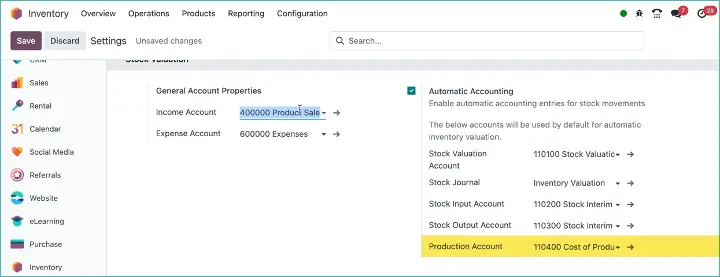
Production cost account
3 new options have been added to a manufacturing order, namely:
- Splitting a manufacturing order.
- Planning manufacturing orders based on component availability. When each component line of a manufacturing order has an expected delivery date, the start date of the manufacturing order will be set to the latest expected date from these forecasts.
- Create an Engineering Change Order (ECO) from the bill of materials of the manufacturing order.
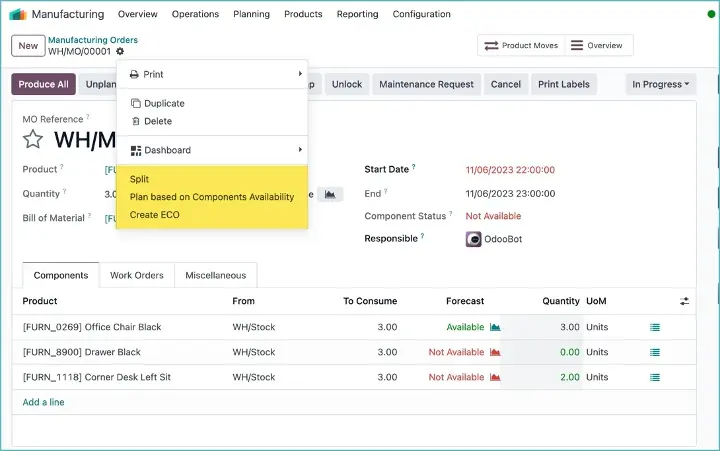
New manufacturing order option
 Odoo 17 - Subscriptions App
Odoo Subscriptions now supports the regular delivery and invoicing of tangible products. Managing, for example, monthly beauty boxes or quarterly subscriptions to fresh fruit is now easier than ever.
 Odoo 17 - Employees App
Work location
Indicate your work location in your calendar and set a physical space or a virtual space, depending on your colleagues' work-from-home schedule.
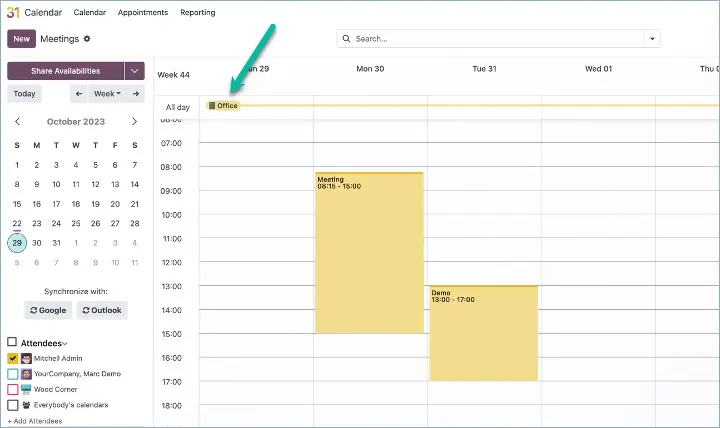
Odoo work location in Odoo Calendar
Organizational chart
A dynamic organizational chart is now available.
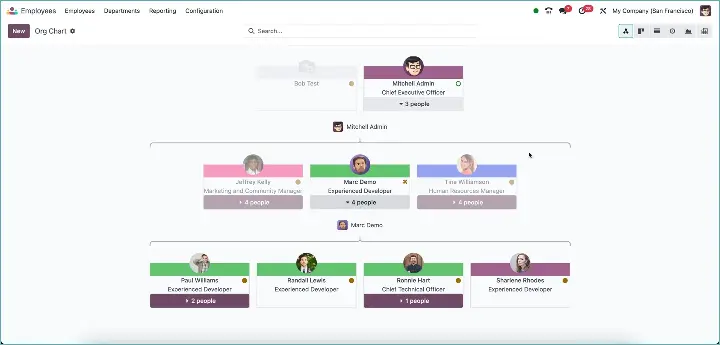
Odoo Organizational Chart
 Odoo 17 - Spreadsheets App
You can now share your dashboard. Odoo will then create a frozen, non-editable version.
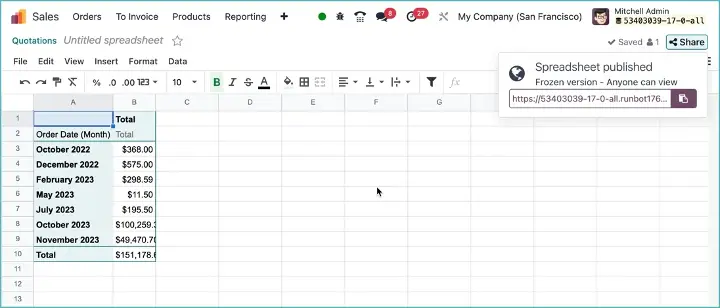
 Odoo 17 - Projects App
Projects Without Company Restrictions
You can now create projects without assigning them to a specific company, which means the project is no longer limited to users with access to the project's company. It is, however, possible to create specific stages per company. This was previously not possible because all stages were shared between all companies. This adjustment personalizes project management for each company.
New planning view
Odoo 17 introduces a new planning view within the Project app. Users can now choose whether they want to assign their planning to a project or a task, offering more flexibility in managing the workflow.
Automatic portal user creation when sharing projects
When a project is shared with a customer who does not yet have a user account, a portal user is now created automatically, even if website access is set to 'invitation only'. This gives customers immediate access to the project via the link they receive, with the option to create a user account.
Support for project features in tasks without a project
Tasks without an overarching project can now benefit from all project features. This offers more flexibility in how subtasks are managed and displayed, so they no longer appear at the same level as their parent tasks, but are only accessible through the parent task.
Create new records from the sales order view
Users can now easily create new tickets, timesheets, and other records from the sales order view without leaving the application or manually linking new records to the sales order.
 Odoo 17 - Rental App
Odoo 17 sets a new standard for the rental sector with improvements that further modernize rental product management. One of the most notable changes is the introduction of warehouse-based rentals.
Advanced logistics for rentals
With 'Stock Rental', you can now deliver and return your rental products through a multi-step process, including delivery and return transfers. This improvement makes rental logistics both flexible and traceable, giving you full control from start to finish.
Smooth transfers
This new feature enables rental companies to optimize their delivery and return processes by using streamlined transfers. This ensures a smooth, error-free movement of rental items to and from customers, improving the overall customer experience.
 Odoo 17 - Repairs
Odoo 17 introduces major improvements in the Repairs app that simplify and expand the management of repair processes. Here is an overview of the refinements:
Separated repair and sales/invoicing
A clear separation has now been made between repair activities and sales/invoicing processes. This provides better overview and improved control over different business activities.
Link between sales orders and repair orders
You can now link one sales order to multiple repair orders. This ensures seamless integration between the sales and after-sales phases.
New 'Repairs' operation type
A new 'Repairs' operation type has been added to warehouses, improving the management of repair work within inventory logistics.
Explode kits in repairs
When a repair order contains kit products (products with kit bills of materials), these are now exploded into components. This means that when you purchase a kit product, it will be exploded into its components in the picking. In the Barcode app, a new line is displayed with the bill of materials information when the product comes from a kit.
Repairs from the returns warehouse
Repairs can now be managed directly from the returns warehouse, simplifying the process of handling returns for repair.
Recycling option for repair components
There is now an option to recycle repair components, contributing to sustainability and cost savings within the repair process.
Repairs directly from sales order
It is now possible to initiate repair orders directly from sales orders, ensuring an efficient link between sales and the after-sales process.
 Odoo 17 - Website App
Odoo 17 enriches the web design arsenal with exciting new features, giving users a more powerful and flexible toolset to manage and improve their online presence. Let's explore some of the most impressive upgrades.
Mobile responsiveness and design
- Background Shapes Optimization: Manage how background shapes are displayed on mobile devices, so your design looks perfect on the go too.
- Customizable Grid Layout: Define the spacing between elements with the new grid layout options and enjoy the new editor design matching.
- Responsive columns: Specifically choose the number of items per row on mobile devices for improved responsiveness of your site.
User experience and interactivity
- Enhanced banner blocks: Easily upgrade banners with improved building blocks.
- New hover effects: Bring your images to life with new hover effects that make your website dynamic.
- Instagram feed: Integrate your Instagram feed directly on your website for more engagement.
- Button labels: Edit button labels effortlessly from the right panel.
Efficiency and functionality
- Multiple file uploads: Allow visitors to upload multiple files at once when filling out forms on the website.
- Drag-and-drop images: Dragged images are saved as attachments and can be used later in the editor.
- New header and page templates: Choose from a wide range of new templates, including some aimed at e-commerce.
Visual adjustments
- Text highlights: Add eye-catching highlights to your website headings, such as hand-drawn circles or waves.
- Theme color palette: Personalize your website's colors with new theme options.
- Shapes on images: Frame your images with new shapes for an extra aesthetic touch.
Innovation and integration
- WebP Image Support: Speed up your website by using the WebP format for images.
- Website configurator with ChatGPT: Generate relevant text for your company when creating a new website using ChatGPT.
 Odoo 17 - Studio App
Odoo 17 Studio brings powerful tools for business customization and automation that will redefine the way you configure your workflows and user experiences.
Refined approval flows
Configure complex, multi-level approval processes with granular control. Odoo 17 allows you to automatically notify users when their approval is required.
Enhanced interface customization
The visibility of buttons can now be controlled with precision. Make each action button permanently visible or hide it conditionally in your form views.
Smart currency field configuration
When you add monetary fields with Studio, the system now automatically identifies and uses the default currency fields in the model. With the updated view editor, you can easily select the desired currency field to use.
Number formatting your way
Enable or disable number formatting with Studio. This is useful, for example, for displaying a year in an integer field without thousand separators.
Revamped report editor
Experience a more intuitive way to edit PDF reports with the new report editor. Use simple / commands to add static or dynamic content to your PDF reports.
Enhanced automated actions
Odoo 17 brings an exciting evolution in workflow automation with significant improvements to automated actions. These latest updates are aimed at increasing user-friendliness and making advanced features more accessible to all users. Whether you are a beginner or an experienced user, the refined interface and smart new triggers allow you to automate workflows with precision and ease. Let's take a look at how these improvements can streamline and personalize your daily tasks in Odoo.
- Easy access via the Kanban menu: A menu option has been added to the Kanban header settings, allowing users to easily add or edit automated actions.
- Custom Kanban view: A new Kanban view has been created that clearly shows each automated action and its corresponding operations.
- "Smart" triggers: Depending on the selected model, specific triggers appear in the form:
- Updated values category: such as "Stage set to" for stage_id fields, or "Status set to" for state fields, where users can select a specific value. There are also triggers such as "Priority set to", "User set" or "Tag added".
- Time-based conditions: such as "After creation" or "After last update".
- Direct multiple actions: You can now have multiple actions follow one another directly.