A customer who orders something usually expects that you can simply deliver it. Not next month, not “when the supplier finally delivers,” but at the moment you promised. At the same time, you don’t want a warehouse full of products that hardly sell. Inventory costs money, space, and attention.
Good inventory management is therefore about balance. You want to have enough stock to deliver to customers, but not so much that your working capital is unnecessarily tied up in the warehouse.
Odoo can help with that. The system connects inventory, sales, purchasing, warehouse, and accounting with each other. But software does not automatically fix a poor inventory process. If product data is incorrect or receipts and deliveries are not processed consistently, you mainly get a digital overview of the existing problems.
In this blog, you will read eleven practical ways to improve your inventory management.
1. First, look at the type of products you sell
Not every product requires the same inventory strategy.
A product with a long shelf life can be managed differently than a perishable product. A seasonal item requires a different approach than a product that sells year-round. The size, value, turnover rate, and delivery time of a product also play a role.
For example, think of:
- products with a limited shelf life;
- items that quickly go out of style;
- seasonal products;
- high-value products;
- fast sellers;
- slow-moving items;
- products that are specially purchased for a customer;
- products that you need to track by batch or serial number.
This classification also determines whether you keep a product in stock, order it only after a customer order, or have it delivered directly by the supplier.
In Odoo, you can record suppliers, delivery times, stock rules, routes, packaging units, and traceability for each product. This prevents every product from being treated the same way, while the practice does not require that at all.
2. Determine which products you really need to keep in stock
Many companies maintain inventory because they have always done so. That is not an inventory strategy.
Ask for each product why it is in stock. Is it necessary to deliver quickly? Is the product hard to obtain? Is the margin attractive? Or is it mainly in the warehouse because someone once decided to order a large quantity of it?
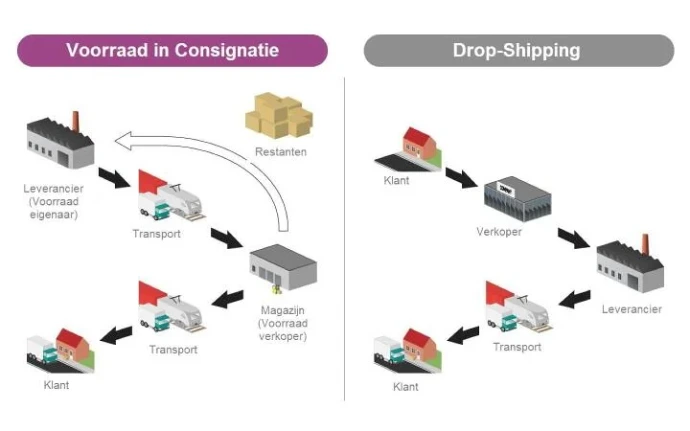
For some products, stock makes sense. Other products are better purchased as soon as a customer orders them. In Odoo, you can work with replenishment based on stock, purchasing on demand, or direct delivery from the supplier.
Direct delivery, also known as dropshipping, can be interesting for products that sell little or take up a lot of space. You don't have to have them come to your own warehouse first. The supplier delivers directly to the customer.
That sounds attractive, but it is not always the best choice. You have less control over packaging, delivery time, and customer experience. Moreover, the supplier must be reliable. Not having a product in stock yourself is fine. Not having control over the delivery is something else.
3. Ensure that product data is reliable
A stock process is only as reliable as the data it is based on.
If the purchasing lead time on the product card is incorrect, Odoo makes a wrong schedule. If the packaging unit is set incorrectly, you may order quantities that do not match reality. And if a product has multiple suppliers, but only one supplier is in the system, you miss an important alternative.
Therefore, check regularly:
- product name and internal reference;
- unit of measure;
- packaging units;
- suppliers and purchase prices;
- purchasing lead time;
- expected delivery time to customers;
- minimum and maximum stock;
- product category;
- batch or serial number registration;
- weight and dimensions.
This may sound administrative, but this is often where things go wrong in practice. A warehouse employee can only work well with information that is correct. A planner can only make good purchases when the delivery time is realistic.
4. Work with minimum and maximum stock levels
A minimum stock indicates when you want to restock. The maximum stock often determines to what level you want to purchase.
Suppose you want to have at least ten pieces of an item available and a maximum of thirty. Once the stock falls below ten, Odoo can make a restocking proposal up to thirty pieces.
That sounds simple, but determining the right values is less straightforward. You need to take into account:
- average sales;
- peaks in demand;
- supplier lead time;
- desired delivery reliability;
- available storage space;
- minimum order quantities;
- shelf life;
- seasonal influences.
A minimum stock of ten pieces means little if the supplier only delivers after six weeks and you sell an average of five pieces per week. Then you will still fall short.
Therefore, do not use restocking rules as a one-time setting. After a few months, check if the proposed values still match the actual demand.
5. Combine historical sales with current information
Historical sales figures are useful, but they do not tell the whole story.
A product may have sold well last year due to a temporary promotion. A customer may start to take less consistently. A supplier may double their lead time. Or a new product line may come in that affects the demand for existing items.
Therefore, use information from the rest of the organization in addition to sales figures:
- expected sales orders;
- planned actions;
- seasonal patterns;
- ongoing quotes;
- contracts with customers;
- modified supplier agreements;
- planned product introductions;
- products that are being phased out.
In Odoo, sales, purchasing, and inventory come together in one system. This means you have to work less with separate Excel spreadsheets that each contain their own truth.
This is also an important difference between a true ERP solution and a collection of separate systems. The information is not only registered somewhere but can also be used for the next step in the process.
6. Consciously choose between stock and purchasing on order
A product that you keep in stock can be delivered quickly. However, you must purchase and finance the product in advance.
When purchasing on order, you limit inventory costs. However, you do run a greater risk of longer delivery times. The choice therefore depends on your customer's expectations and your supplier's reliability.
In Odoo, you can use different routes for each product or product group. A fast seller can, for example, be supplemented with a stock buffer. An expensive, low-selling item can be purchased on order. A product that is part of a custom order can be directly linked to that order.
It is wise not to choose one inventory strategy for your entire assortment. In practice, a combination usually works better.
7. Use multiple suppliers where it makes sense
A supplier that always delivers on time is valuable. But relying on one supplier can be vulnerable.
Think of delivery issues, price changes, temporary shortages, or market changes. For important products, it may be wise to have an alternative supplier on hand.
In Odoo, specify for each product which suppliers provide the item, what their delivery time is, and what price agreements apply. This allows purchasing to act more quickly when the regular supplier cannot deliver.
Do keep in mind that having multiple suppliers is not automatically better. More suppliers also means more agreements, more checks, and possibly different product qualities. Use a second supplier especially where delivery reliability is more important than maximum simplicity.
8. Organize your warehouse logically
A good inventory level helps little if employees cannot quickly find products.
Use clear warehouse locations and organize your warehouse based on the movements in your assortment. Fast movers can be located closer to the packing or shipping area. Heavy items should be placed where they can be handled safely. Products with a limited shelf life should be collected in a suitable order.
Odoo supports warehouses, zones, shelves, internal locations, and various goods flows. This allows you to not only register how much inventory you have but also where that inventory is located.
A logical warehouse layout also makes it easier to train new employees. You do not want the knowledge about the location of products to reside only in the mind of one experienced warehouse employee.
Read also: Odoo order picking strategies.
9. Use barcodes for receipts, transfers, and deliveries
Manually entering inventory changes takes time and leads to errors. A product is forgotten, the wrong item is chosen, or a quantity is incorrectly recorded.
With barcodes, employees can scan products during:
- receipt of goods;
- internal transfers;
- order picking;
- packaging;
- delivery;
- returns;
- inventory counts.
The inventory is then updated at the moment the physical movement occurs. This provides sales and purchasing with a more reliable picture of what is actually available.
Barcodes are not a magic solution. If employees skip receipt or delivery steps, the inventory remains unreliable. The technology only works well when the procedure is clear and everyone follows it.
For many companies, it is wise to first simplify the process and then add barcodes. A scanner speeds up a good process. It mainly makes a complicated process faster complicated.
10. Use the right inventory strategy for each situation
There is no inventory strategy that works for every company and every product.
In make-to-stock, you maintain inventory based on expected demand. This is suitable for products that need to be delivered quickly.
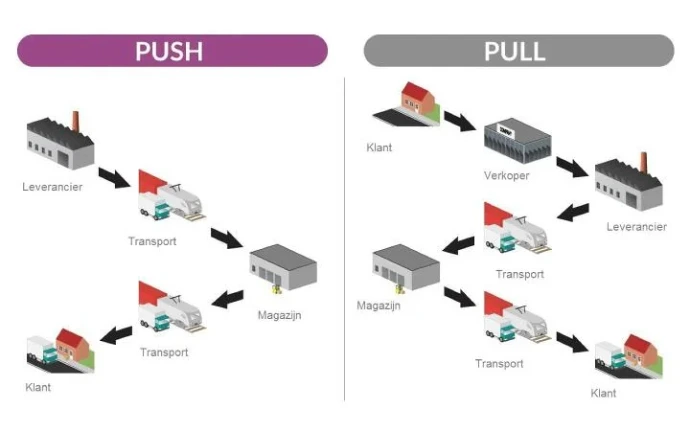
In make-to-order, a product is only purchased or produced when there is a concrete customer request. This limits the inventory but can extend the delivery time.
With just-in-time, you try to receive goods as late as possible so that they do not sit in the warehouse unnecessarily long. This can reduce inventory costs but makes you more dependent on planning and suppliers.
With consignment inventory, the stock is with you, while the supplier remains the owner until the product is sold. This can be interesting in certain collaborations but requires clear agreements about registration, risk, and invoicing.
In Odoo, you can combine these routes. The right choice depends on the value of the product, the demand, the lead time, and the consequences of a stock shortage.
Also read: The Odoo Just in Time inventory system.
11. Automate replenishment, but keep checking
Odoo can create replenishment proposals based on inventory rules, sales, lead times, and routes. This saves time and prevents employees from having to assemble every order completely manually.
However, you must continue to check automatic proposals.
A supplier may temporarily be unable to deliver. A product may disappear from the collection. A customer may place a large one-time order. Or the sales forecast may change significantly.
Automation therefore works best as support for the purchasing process. Not as a reason to let go of all control.
For example, make agreements about:
- who checks replenishment proposals;
- when exceptions are manually assessed;
- which products receive extra attention;
- how changes in lead times are processed;
- how often inventory rules are evaluated.
The goal is not to let software make every decision. The goal is to allow employees to focus on the decisions that really matter.
Don't forget the inventory value
Inventory management is not just about quantities. The financial value of the inventory is at least as important.
Inventory that sells slowly can tie up a lot of money. A product may be limited in quantity, but still pose a significant financial risk. Conversely, a large quantity of cheap items may have little impact on your total inventory value.
Odoo can link inventory movements to the financial administration. The chosen cost price method, such as fixed cost price, average cost price, or FIFO, affects the valuation of your inventory and the cost price of your sales.
Therefore, you should not only ask:
“How much do we have left?”
But also:
“What is this inventory worth and how quickly is it sold?”
Read more about inventory valuation in Odoo.
Counting inventory remains necessary
An ERP system does not automatically know what is physically in the warehouse. The system only knows what employees have recorded.
Regular counts remain necessary. This does not always mean that you have to stop the entire warehouse once a year. With cyclical counts, you can check certain product groups or locations throughout the year.
For example, pay more attention to:
- valuable products;
- fast sellers;
- items with many inventory changes;
- products with a high error rate;
- locations where discrepancies often occur.
Investigate a discrepancy not only how much is missing. Also look at the cause. Is a receipt not processed? Is a return incorrectly booked? Are internal transfers skipped? Or is the product located elsewhere?
A stock adjustment resolves today's discrepancy. Only the cause prevents the same problem from recurring next month.
Inventory management is a business process
Good inventory management is not just the responsibility of the warehouse. Sales promises delivery times. Purchasing orders products. Finance looks at the inventory value. The warehouse receives, moves, and delivers. Management determines how much risk and inventory costs are acceptable.
Odoo brings these processes together, but the organization still needs to make clear choices.
The most important improvements usually do not start with complicated automation. They begin with reliable product data, clear responsibilities, and a procedure that employees can follow.
After that, you can further automate with replenishment rules, routes, barcodes, inventory locations, and reports.
Conclusion
Improving inventory management does not mean you need to hold more stock everywhere. It means you know better which stock you need, when to replenish, and which products should not be in your warehouse.
With Odoo, you gain insight into inventory levels, locations, expected deliveries, purchase proposals, and inventory value. But the quality of that insight depends on the setup and daily use.
Therefore, start with the basics:
- ensure reliable product data;
- determine an appropriate inventory strategy for each product;
- set realistic delivery times;
- organize warehouse locations logically;
- process receipts and deliveries immediately;
- count regularly;
- automate where it adds value;
- check if the numbers still align with reality.
Then inventory management becomes more than just keeping track of numbers. It becomes a tool to sell better, purchase smarter, and deliver to customers more reliably.