Odoo 19 is about to be launched and is packed with innovations that make your work easier and faster. From smart AI features that take over routine tasks to improvements in sales, inventory and project management: this version is designed to help you spend less time clicking and searching.
In this blog, you will read what is new in Odoo 19 and how you can use these features to optimize your processes. We have clearly listed all improvements by main topic so you can quickly see what impact they have on your daily work.
For organizations that will soon upgrade from an older version, there is one important addition in this overview: for every change that affects existing processes or habits during an upgrade, we have added a special label:
Pay attention during upgrade
This way, you can see at a glance where extra attention or preparation is needed.
Interface improvements: work smarter, more calmly and more securely
Odoo 19 makes everyday use much more pleasant. The interface has become calmer, you can navigate more efficiently and Odoo responds better to your personal preferences.
Select multiple cards at once in Kanban
Do you work with Kanban boards in, for example, Project, CRM or Helpdesk? You can now select multiple cards at once to perform actions in bulk. This works similarly to the list view and saves a huge number of clicks. Especially in teams that manage dozens of tasks or requests every day, this results in significant time savings.
Sections collapsed by default for better overview
Forms can become quite long when there are many properties or settings. Thanks to a new option, you can set certain sections to be collapsed by default. This keeps the screen organized and shows only the information you need at that moment. It works more pleasantly and faster.
Odoo remembers your personal preferences
Do you often work with the same view settings or specific buttons within forms? Odoo now remembers your choices for so-called embedded actions. This means you have to switch between settings manually less often. Your work environment stays the way you find most comfortable.
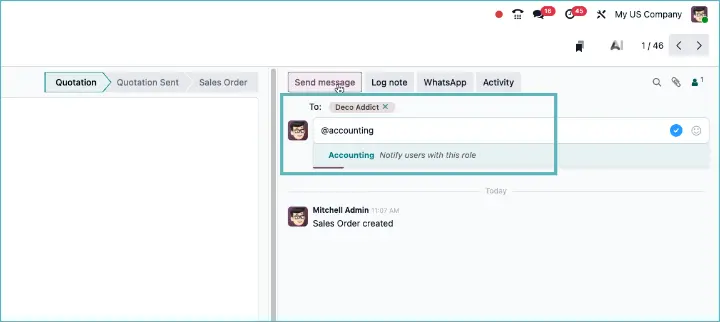
Send messages to groups of people based on their role
In the chat application, you can now assign colleagues to a role and send them a message all at once
Open a form or overview in a new tab
From now on, you can open any screen in Odoo in a new browser tab. This makes it easy to look up information on another screen without interrupting your current work. Useful if, for example, you want to consult a customer record while preparing a quotation.
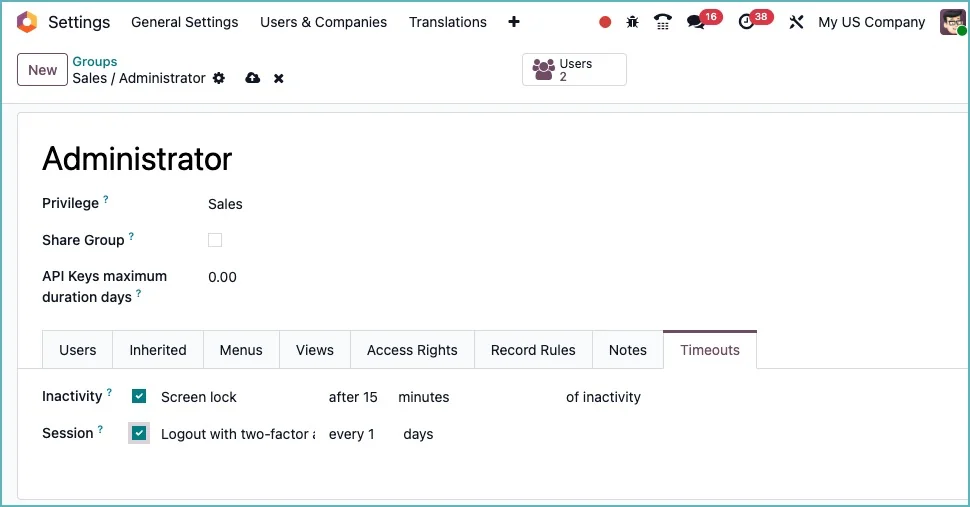
Extra security through automatic re-authentication
For organizations that work with sensitive data, there is good news: Odoo now supports automatic re-authentication after inactivity. If a user does nothing for too long, Odoo asks them to log in again. This feature also works in combination with multi-factor authentication (MFA), thus increasing the security of your environment.
Passkeys now also for portal users
In Odoo 18, only internal users could log in with passkeys. In version 19, this secure and user-friendly login method is finally extended to portal users. This means that customers and external partners can also log in without a password, using a biometric scan or another passkey-supported device.
Clear and recognizable date display
The date fields in Odoo 19 have been thoroughly redesigned. You can now see readable dates at a glance that better match your language settings. The way date and time formats are selected has also been improved. This prevents confusion and makes the display more consistent for international teams.
Pay attention during upgrade
Renewed access rights management for users and groups
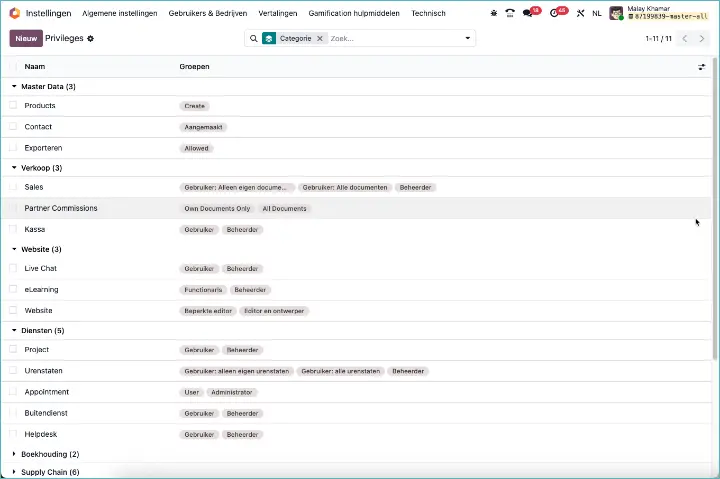
In Odoo 19, the management of users and groups has been significantly overhauled. Whereas in earlier versions this often felt somewhat cumbersome and technical, it is now clearer, more consistent and more secure.
As an administrator, you will now see the groups sorted by hierarchy and order, making the structure in large databases with many groups immediately clear. In addition, a new Users button has been added to the group view. This allows you to immediately see from a group which users belong to it.
Odoo now guarantees that there is always at least one administrator present, so you can never accidentally end up without an administrator.
The biggest step forward is the introduction of Privileges. This gives the interface for groups and rights a much tighter structure and opens the door to more flexibility in future versions.
Set up your own SMS provider with Twilio
Until now, Odoo handled SMS traffic automatically via an IAP service. Handy, because you hardly had to configure anything. But in countries such as the US, Australia and the UK, telecom providers increasingly require you to register yourself and give permission to be allowed to send SMS messages. As a result, the standard method sometimes did not work at all.
That is why there is good news now: with Odoo 19, you can link Twilio directly. You create an account with Twilio yourself, enter your API key in Odoo and you are ready to go. No Odoo intervention needed anymore. Full control and deployable worldwide.
Odoo immediately offers support for SMS Marketing and Marketing Automation via Twilio, so you can get started with that right away as well. A smart step toward international reliability and flexibility.
AI and automation: work smarter with artificial intelligence
Odoo 19 takes automation to a higher level. The AI-related additions provide faster processing, better insights and fewer manual actions. These improvements show how AI is increasingly playing a role in everyday work.
More insight into lead scoring
CRM now shows extra details for automatic lead scoring. You can see why an opportunity scores high or low and which factors play a role in that. This makes the system more transparent and helps with following up sales opportunities.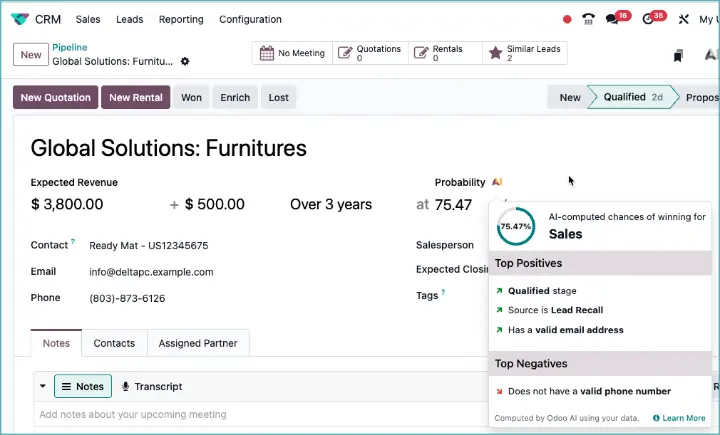
Pay attention during upgrade
Smarter selection of contacts
When creating a lead in the Kanban view, you can now switch more easily between contacts and companies. This prevents assignment errors and speeds up the sales process.
Better prediction of sales outcomes
Odoo now applies predictions of won or lost leads consistently throughout the entire CRM system. This improves the quality of your sales pipeline and allows you to work with more realistic expectations.
Pay attention during upgrade
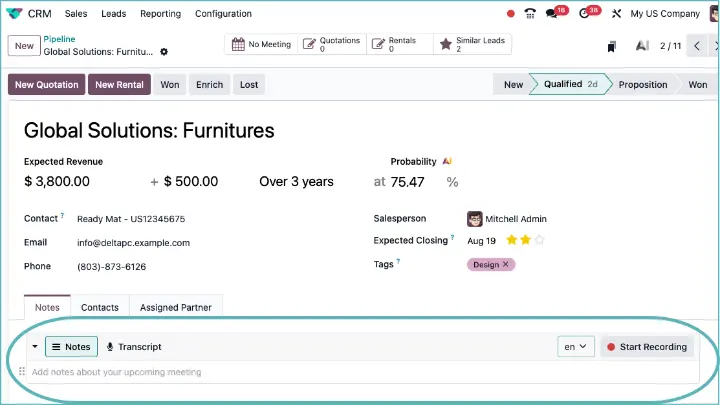
AI voice recognition for notes
Odoo can now convert spoken text into written text within text fields. This feature is especially useful for adding notes after a customer conversation or dictating tasks.
Generate leads from business cards
With the help of AI, you can upload a photo of a business card and automatically create a new lead. Odoo recognizes the company name, contact person and email address and converts this into a CRM record.
Automatically sort documents
With the help of AI, you can now automatically classify and group documents. A new server action has also been added that lets you call AI for specific sorting tasks.
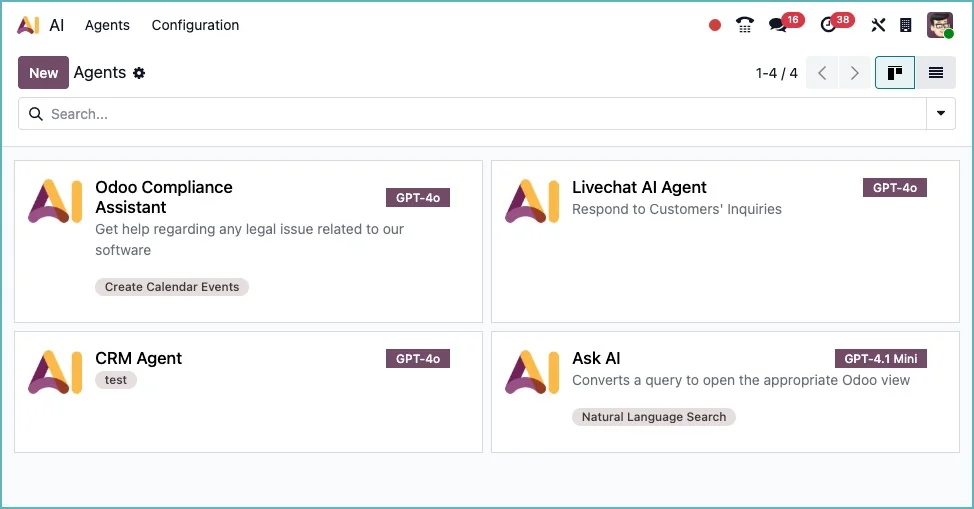
AI agents for documents and calendars
A new AI module is available with simple agents that can summarize and process documents. They can also automatically create appointments in your calendar based on context.
Record and transcribe conversations
The VoIP integration has been expanded with automatic transcription of phone calls. You can now listen back to a conversation and review the full text. Useful for customer service and sales.
Sales and subscriptions: more flexibility and simplicity in customer relationships
Odoo 19 offers powerful improvements for companies that work with quotations, sales projects and subscriptions. The focus is on flexibility in sales processes, better communication with customers and more control over document layouts. These are the most important innovations in sales and subscriptions.
Standard formatting for quotations
Quotations in Odoo now look professional right away thanks to new standard headers and footers. You no longer need to add these manually every time, allowing you to send quotations faster and present a more consistent image to customers.
Start projects without a service product
You can now link projects to sales orders without necessarily having a service product attached. This makes it possible to start projects more flexibly, for example based on physical products or internal agreements.
Gift cards visible in sales orders
The loyalty module now also shows gift cards directly on sales orders. This makes it clear to salespeople and customers which balances have been used and how they are settled.
More control over the layout of your sales documents
You can choose whether or not to show sections, subsections and prices on quotations. These new settings give you more control over how you present your proposals to customers.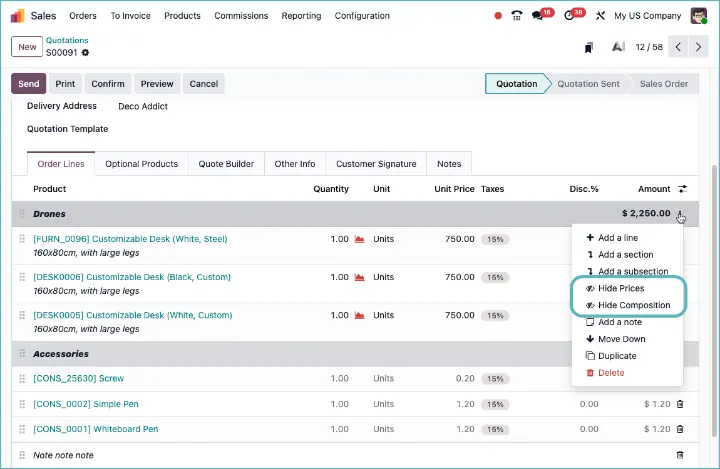
Note for upgrades
Automatic purchase order from sales order via UBL
Thanks to UBL integration, you can automatically generate a purchase order as soon as a sales order is created. This speeds up the process and prevents errors when transferring data. Especially useful for companies that work with electronic invoicing or supplier integrations.
Note for upgrades
Temporarily pause a subscription via the customer portal
Customers can now temporarily pause their subscription themselves from the portal. Handy if, for example, they are going on vacation or want to skip a month. After a maximum of one month, they can also reactivate the subscription themselves.
Note for upgrades
One-time purchase possible within a subscription
Products that you offer as a subscription can now also be made available for a one-time purchase. This gives your customers more freedom of choice and allows you to respond to different purchasing needs without adjusting your product structure.
Point of Sale: work faster, smarter and more pleasantly at the checkout
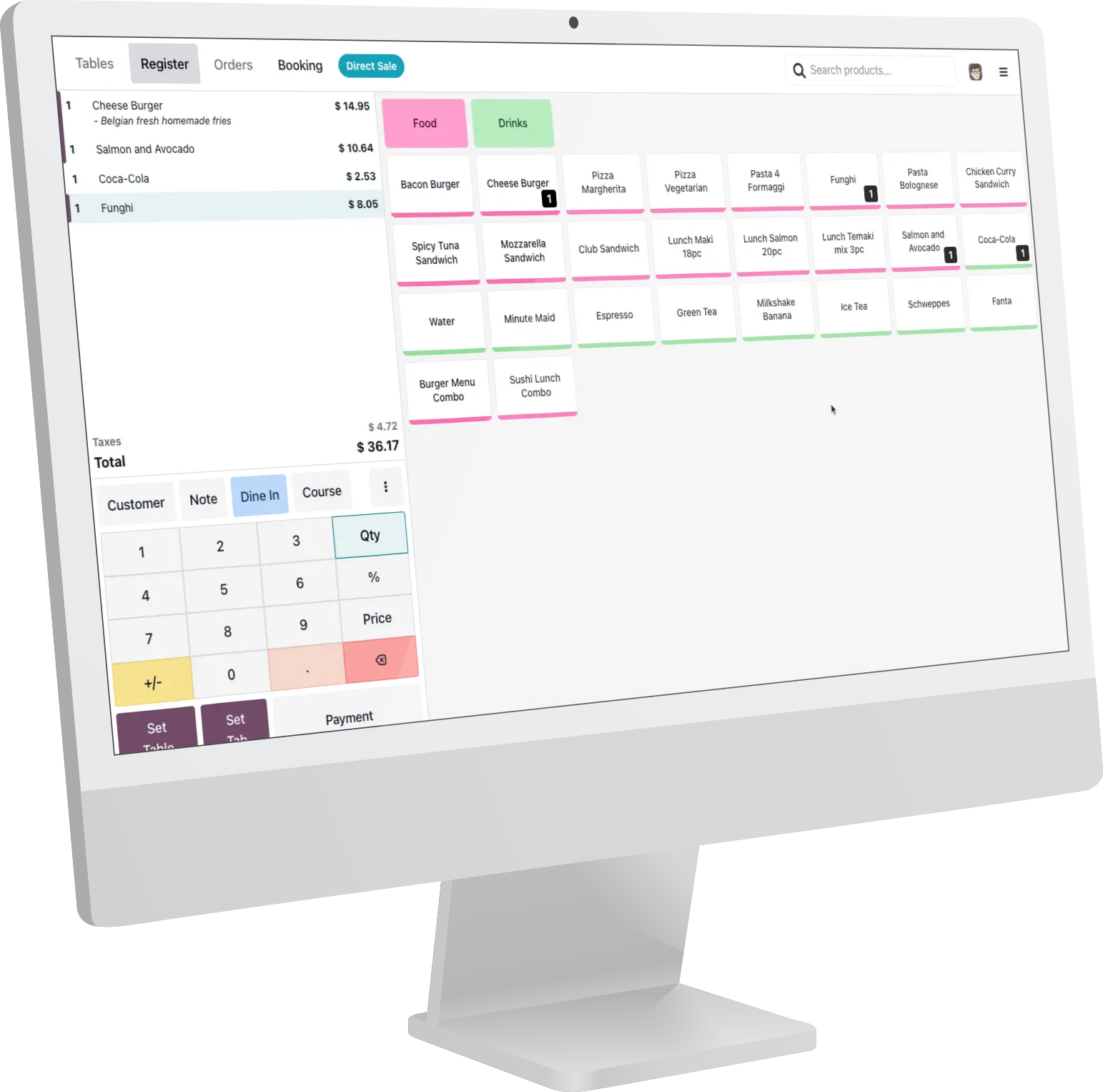
A lot has changed in Odoo 19 for users of the Point of Sale module. The improvements focus on ease of use, speed, visibility of important information and a modern look. From QR codes to dark mode: these are the eight most important innovations.
QR code on the POS screen
It is now possible to display a QR code on the POS screen. This can, for example, be used to quickly open the receipt, scan orders or speed up digital payments. Both customers and employees benefit from a smoother checkout process.
Warnings for customers or products
When selecting certain customers or products, warnings can now appear automatically. This helps prevent mistakes when selling, for example, products with age restrictions or to customers with outstanding balances.
Note for upgrades
Improved shortcuts and faster actions
The configuration of shortcuts and preset choices (shortcuts) has been simplified. This allows cashiers to work faster and helps new employees get up to speed more quickly.
Note for upgrades
Real-time stock indication
Instead of the theoretical stock, the 'available stock' field is now shown on the POS screen. This gives a more realistic view of what can be delivered immediately, especially with multiple warehouses or reservations.
Note for upgrades
Dark mode for the POS
Odoo 19 introduces a full dark mode for the POS system. It looks modern and is easier on the eyes when used in low-light environments, such as hospitality venues or convenience stores open in the evening.
Customer list with infinite scrolling
When selecting customers, you can now easily keep scrolling through the customer list. This is especially useful with large customer databases or in B2B environments.
Group your invoices by day
Instead of separate invoices per order, you can now consolidate invoices. Ideal for stores that process many small transactions every day but want to send only one invoice per customer.
Create invoices from already processed orders
You can now also create an invoice afterwards for POS orders that have already been completed. This offers more flexibility if customers later still want an invoice or if something needs to be changed after completion.
Superfast payments in the POS
In Odoo 19, checking out in the POS app has become much faster. You can now set payment methods as fast payment. This means you can complete payments with one click, without first going through the standard payment screen.
For employees in a busy store or restaurant, this is ideal: fewer clicks, less waiting time and a much smoother checkout process. You especially notice the difference during peak times, because customers are helped faster and throughput increases.
Receipt now shows the store name
From Odoo 19 onwards, the receipt in the Point of Sale no longer shows the company name and official address, but the name of the store where the sale actually took place. That may seem like a small detail, but for chains with multiple branches it ensures clearer communication to the customer and a more professional appearance at the checkout. It also better matches how customers experience the store: they buy something in the physical shop, not at the head office.
Note for upgrades
Inventory, purchasing and manufacturing: more control over goods flows
Odoo 19 brings significant improvements to inventory management, production processes, and procurement logic. Companies working with products, suppliers, and assembly benefit from more automation, fewer errors, and better insights.
A renewed approach to units and packaging
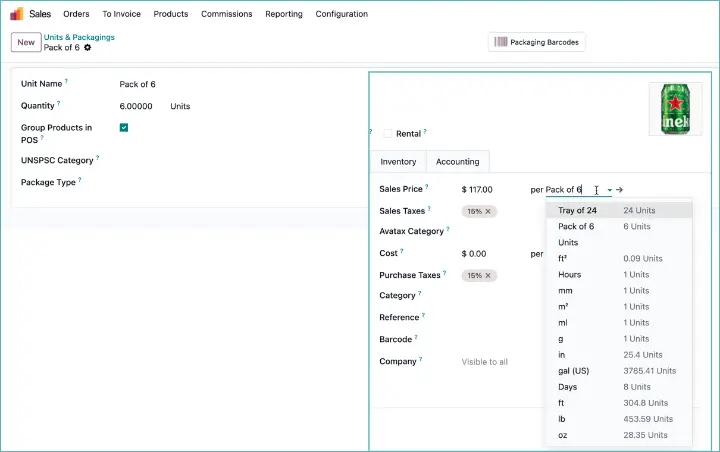
Odoo 19 significantly overhauls the way you work with units of measure (UoM) and packaging . The goal: more simplicity and flexibility.
Until now, units were classified into categories, such as length or weight. That made it impossible, for example, to purchase in pieces and sell in kilos. In Odoo 19, these categories have disappeared. You can now freely combine units, which fits much better with the reality of companies that work with different measurement methods.
In addition, the separate table for packaging has been removed. Previously, packaging and unit were separate, with duplicate fields for quantities and packaging units. This often led to confusion and extra complexity. In the new approach, you simply create packaging as a unit. You then link it to a product and can even assign barcodes to it. This makes it easy, for example, to work with individual bottles, six-packs, and boxes as separate units.
Labels and barcodes updated
The labels printed with ZPL printers now have an improved layout. As a result, they are easier to read and better aligned with the layouts companies use in practice.
Note when upgrading
Smarter replenishment with units
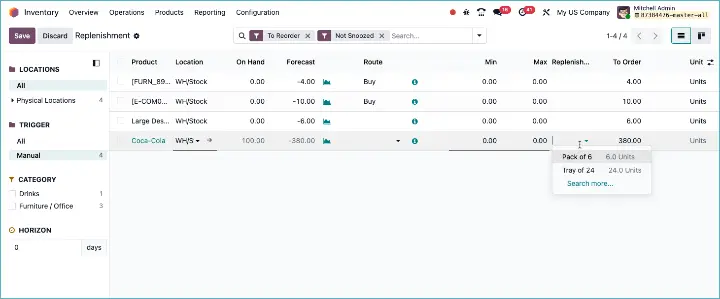
The way Odoo handles replenishment quantities has been significantly changed in version 19. Previously, this worked with the multiples fields on the replenishment rule. This has been removed and replaced by a new setting Replenishment unit of measure.
If you do not specify a particular unit, Odoo automatically uses the default unit from the pricelist or from the bill of materials to determine in which quantities replenishment should be done.
The advantage? A much more consistent replenishment system that directly matches how your suppliers or production processes work. Whether it is boxes, crates, or packaging: Odoo now follows the logic of your suppliers and BoM, instead of a separate field you had to maintain yourself.
Note when upgrading
Better planning of batch operations
You can now determine much more precisely which operations are part of a batch shipment. This makes managing warehouse teams more efficient, especially for complex order picking.
Enable or disable the MTO route with a single checkbox
The 'Make To Order' route can now be easily activated through a setting. This means you no longer need to create custom routes for standard customization.
Product form adjusted for quantities
The product form has been redesigned. The input fields for quantities are grouped more logically, so inventory managers make fewer mistakes when entering or changing data.
Change product type during the lifecycle
You can now change the type of a product (for example, 'storable' or 'consumable'), even after it is already in use. This offers more flexibility when changing product strategies.
Note when upgrading
Product name and movement description combined
For stock moves, you now see the product name and the movement description as a single line. This provides more clarity on packing slips, lists, and warehouse workers' screens.
Note when upgrading
Purchase unit removed
The separate per-product field for purchase units has been removed and moved to a per-supplier field. This makes separate purchase units per supplier possible.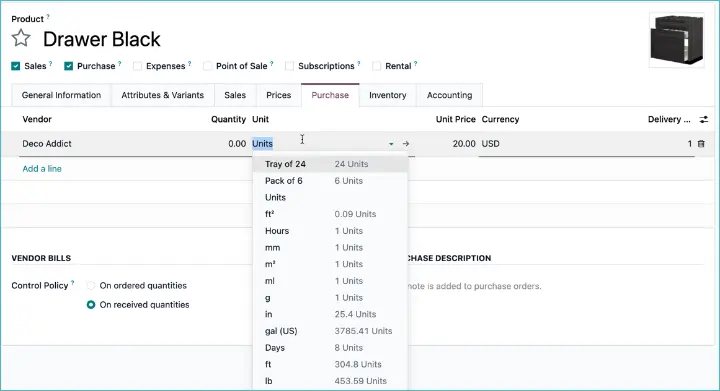
Note when upgrading
No more blocks when a supplier is missing
With Make To Order, it is no longer mandatory to fill in a supplier. Odoo no longer blocks the process, allowing the flow of goods to continue more smoothly.
Note when upgrading
Cost per operation visible in manufacturing
You can now add a cost estimate for each operation in the production process. This helps with margin analysis and optimizing production capacity.
Repairs moved to service tracking
The logic for creating a repair has been moved to the service tracking module. This aligns it better with other forms of customer-facing service delivery.
Note when upgrading
Quickly scan components with barcodes
On the shop floor, you can now scan components by their serial number or lot number when executing a work order. This speeds up the process and prevents input errors.
Register partial delivery in manufacturing
When producing larger quantities, you can now also register partial production. This reduces the need for backorders and makes your inventory management more accurate.
Product images via Barcode Lookup
Instead of Google, Odoo now retrieves product images via barcodelookup.com. This provides better and more consistent results when automatically recognizing items.
Specific access rights for product management
A separate user group has been added for product management. This allows you to assign permissions to employees who manage products, without giving them access to other administration modules.
Note when upgrading
Multiple packaging levels in Odoo: pallets, boxes, and everything in between
In Odoo 19, you can finally use multiple packaging levels. This means: pallets with boxes on them, and possibly even smaller packaging inside those. Something that occurs in every warehouse, but until now was not properly supported in Odoo.
Thanks to this improvement, you can now truly nest packaging. One package can contain other packages, and when moving a parent package, the underlying packages are automatically moved along with it. Additional data is also available per package, such as reservations and the history of previous movements.
A new visual interface has been added to the receipt and delivery screens (optional per operation type), allowing you to easily manage and pack packages. For serial work with pallets or boxes, this is a huge step forward.
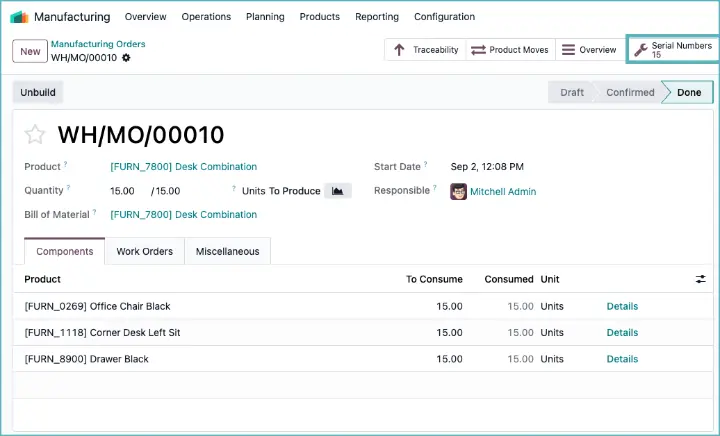
Multiple serial numbers per manufacturing order
Until now, Odoo stuck to the principle: one manufacturing order = one serial number. But with Odoo 19, that changes. You can now create and manage multiple serial numbers within a single manufacturing order. Extremely useful for companies that produce in batches, but still want traceability per individual product.
The interface has been adjusted to support this. For products with lot tracking, you can simply choose the lot number or have it generated automatically. For products with serial number tracking, you open a wizard to create multiple serial numbers at once. These are clearly displayed via a smart button. There is also a convenient “Clear” button to quickly reset if you selected the wrong set.
Project, planning, and helpdesk: organize smarter and plan better
Odoo 19 offers new possibilities for project management and planning. From better task management to automatic role assignment and smart links with other modules: these innovations make planning and organizing much easier.
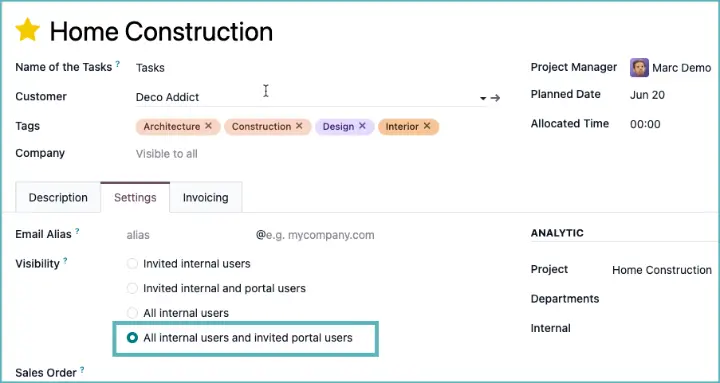
New access option for projects
In Odoo 19, a fourth visibility setting has been added for projects. This allows you to share a project with only selected internal users and specific portal users, without making it visible to everyone within your organization.
This means you can now determine much more precisely who gets access, ideal for sensitive projects or processes where you only want to involve a few colleagues or customers. It gives you more control and prevents projects from being unnecessarily accessible to a wide audience.
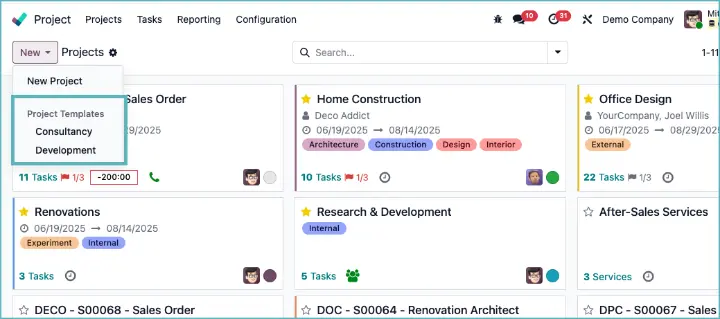
Create projects based on templates
Setting up projects often takes time because you have to go through the same settings again and again. In Odoo 19, that is a thing of the past: you create a project template with the desired structure, tasks and settings and use that as the basis. New projects are immediately set up correctly and ready to use.
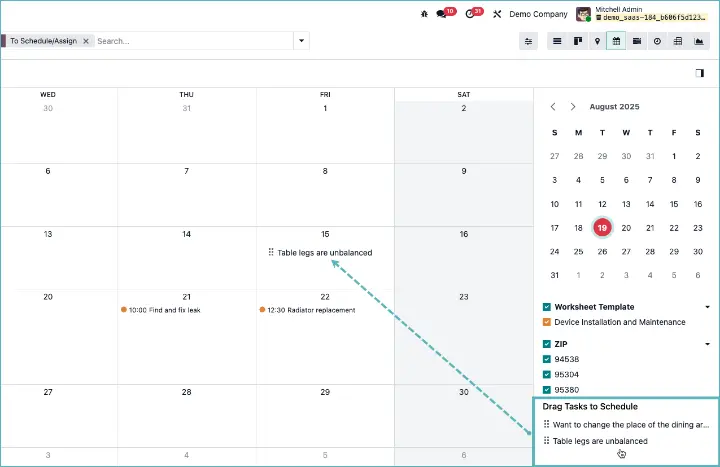
Schedule tasks in the calendar
In the calendar view, you can now easily drag tasks to specific time slots. In the sidebar, you can see tasks that do not yet have a scheduled time, so you can quickly plan them. This gives project managers more control over capacity and staffing.
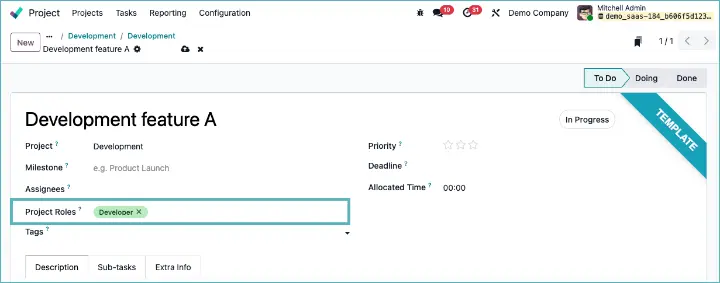
Automatically assign tasks based on role
Project tasks can be assigned automatically to team members based on their role within the project. As a result, tasks are distributed more quickly and planning aligns better with the team's responsibilities.
Subtasks more clearly visible
For tasks with subtasks, there is now a button to explicitly display subtasks. This lets you see at a glance which actions are still open within a main task. That makes progress and collaboration clearer.
Schedule events in time slots
The Events module now supports working with time slots. This makes it possible to split workshops, webinars or trade fairs into sessions, for which participants can register per slot.
GPS tracking for Field Service
For field service tasks, you can now use geo-tracking. This automatically records location and time tracking, which increases the reliability of time reporting.
Documents decoupled from projects
The link between documents and projects has been simplified. Instead of fixed project folders, you now work with general folders, which provides more flexible document management and less complex links.
Please note when upgrading
Assign helpdesk tickets
Automatically assigning helpdesk tickets based on tags ensures that reports immediately end up with the right employee or team. This means tickets no longer have to be sorted manually first, which saves time and shortens response times for customers. In addition, questions are picked up more quickly by someone with the right expertise, improving service quality.
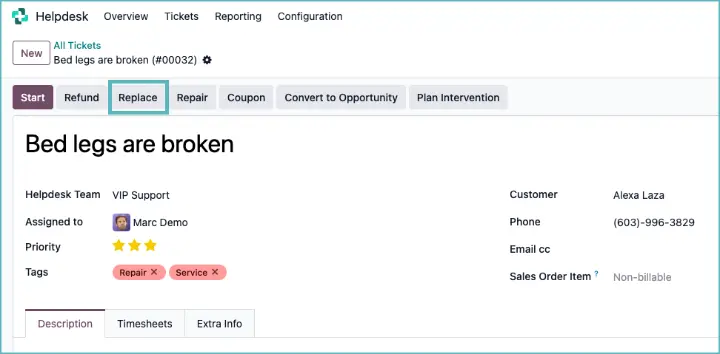
Product replacements directly from Helpdesk
In Odoo 19, the Helpdesk app has become smarter with a new replacement option. For each helpdesk team, you can set that a replacement feature is available. As a result, a button appears in a ticket: Replace, which lets you create a replacement order immediately.
Send gift cards from the helpdesk
Want to keep a customer satisfied after a complaint or incident? With Odoo 19, you can now create a digital gift card directly from a helpdesk ticket. This new option in the after-sales tools is ideal for restoring customer trust or as an extra token of appreciation.
Employees with the right permissions see a 'Gift Card' button in a helpdesk ticket. This opens a wizard where you choose the value, the program and the recipient. As soon as you confirm, the voucher is automatically sent to the customer by email. The email (including attachments) is also immediately logged in the chatter, so you can follow everything up neatly.
In addition, you get a clear status button on the ticket with all sent gift cards.
Automatically assign user from email recipients
When you send an email to the project address to automatically create a task, Odoo now also checks who else is in cc on the email. If there are internal users there, the task is automatically assigned to those users. This saves manual work and prevents colleagues from accidentally being forgotten when picking up incoming tasks.
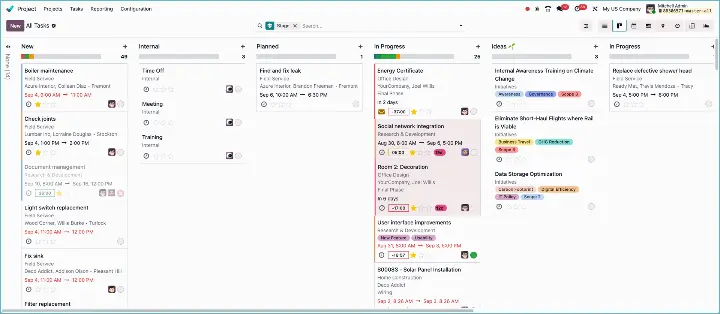
Neglected leads and projects? Now you can see them at a glance
In Odoo 19, you automatically get a signal when a sales opportunity, project task or application remains inactive for too long. This happens via the new 'rotting' logic: as soon as something starts gathering dust, it is visually highlighted on your kanban board.
This works not only in CRM, but also in Project and Recruitment. You can immediately see which tasks, leads or applications need attention. You also get visual hints in list and form views.
So you no longer have to squint at overdue items yourself. Odoo simply shows you. Handy for anyone who wants to keep their pipeline or planning tight.
Website and e-commerce: smarter content and better SEO
With Odoo 19, building a strong online presence becomes easier and more powerful. The improvements focus on search engine optimization, smart content generation and better integrations with external platforms.
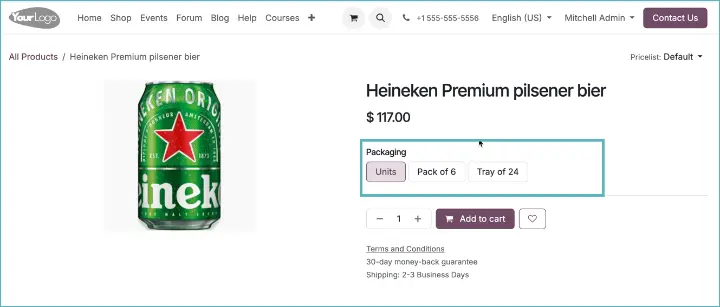
Sell per packaging unit
With Odoo 19, you manage multiple sales packaging options per product. In the webshop, the customer can immediately see whether they want to order a single item, a bundle or a larger package. This makes online sales more flexible and more customer-friendly.
Improved SEO tools
The SEO interface has been redesigned. You can now add alt texts to images more easily and fix broken links. This helps your website rank higher in search engines and prevents errors that worsen the user experience.
Google Merchant Center integration
You can now easily publish your products in Google Merchant Center. This makes it easier to be visible in Google Shopping, allowing you to drive more traffic to your webshop.
Redesigned product pages
The structure of product pages has been redesigned. More attention is given to components such as images, attributes and call-to-action buttons. The result is a modern product display focused on conversion.
Please note when upgrading
New layouts for appointment widgets
The Appointments module has two new views: a list view and an image-based layout. This allows you to present appointments to your customers in a more visually appealing way.
AI for website texts
A new AI integration is available to generate pages automatically. The AI agent can write texts based on the content of your website, allowing you to build good landing pages faster.
AI chat on your website
In addition to AI for content, an AI-driven live chat is now also available. You can integrate it directly into your website and use it to automatically help visitors or direct them to the right page.
Bookings via Google Maps
With Odoo 19, it becomes even easier to reach customers thanks to the new Google Reserve integration. Businesses that work with appointments, such as restaurants, hairdressers or wellness centers, can now make their reservations directly available via Google Maps.
This means that a customer who looks up your business on Google Maps can immediately book an appointment without having to open your website. The appointments are neatly entered into your Odoo calendar, so everything remains centrally managed.
The connection works via Odoo’s IAP server, which acts as an intermediary layer between Google and your Odoo environment. Availability, bookings and changes are synchronized automatically.
Accounting and administration: more control, better year-end closing
Odoo 19 brings important innovations for finance professionals. The focus is on clarity, security and better alignment with legal requirements.
New inventory valuation in Odoo 19
Odoo 19 introduces a completely redesigned system for inventory valuation. The goal is to make accounting simpler and more consistent, without the technical complexity of the past.
Previously, valuations were processed through separate incoming inventoryand outgoing inventory accounts and many details were stored in the so-called stock valuation layers. This often led to confusion, especially with error corrections or reversals. In the new approach, everything revolves around the documents themselves: the invoice, the order or, as a last resort, the manual valuation. This ensures that the inventory value is directly aligned with the financial records.
Important innovations for users:
- Real-time valuation now takes place on invoices and bills, no longer on deliveries or receipts. This provides more clarity in the link with accounting.
- Automatic closing reports help manage delivered but not yet invoiced goods and received goods for which no bill has yet been received.
- Backdating and error handling have been improved: the system reports inconsistencies such as rounding differences and lets you correct them.
- The value of inventory is no longer recalculated across the entire history, but based on the latest documents (for example for FIFO).
For companies, this means: less complexity, fewer errors and a more reliable link with accounting.
Please note when upgrading
New way of reconciling bank transactions
In Odoo 19, processing bank statements has been completely redesigned. Where the old screen was often cluttered and complicated, there is now a modern kanban view that makes bank lines much more intuitive to handle.
Each bank line is displayed as a card that you can expand for more details. From there, you can perform actions directly, such as linking it to an invoice, creating an entry or editing a line. This makes the whole process feel faster and clearer.
A lot has also been cleaned up behind the scenes. All kinds of settings that often caused confusion in practice have been removed. Odoo now makes smarter suggestions itself for matching and reconciliation, so you have to configure less manually. The result: less chance of errors and more focus on handling your bank transactions.
Please note when upgrading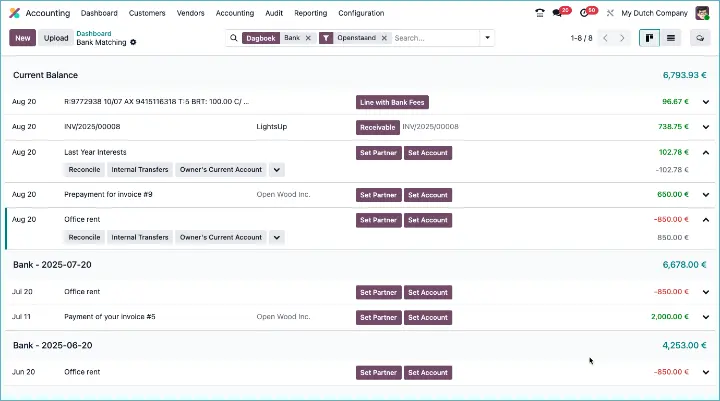
Smarter automatic reconciliation rules
Bank reconciliation in Odoo 19 has become another step smarter. The system now learns from your previous choices. As soon as you assign an account to a bank line, Odoo automatically looks at the last five similar lines. Does it see a clear pattern there, such as the same description, partner or amounts? Then Odoo creates a new reconciliation rule itself.
The nice thing is that these rules keep adapting. If you later choose a different general ledger account for the same label, Odoo removes the old rule and adapts to your new way of working.
Templates per journal
You can now set a default invoice template per journal. This ensures more consistent output per entry type and prevents you from having to manually choose the correct layout each time.
Please note when upgrading
Reconcile draft entries
From now on, it is also possible to reconcile draft entries. This makes it easier for external accountants and auditors to review and correct a trial balance in advance where necessary.
Better prepared for year-end closing
When performing a year-end closing, Odoo now performs additional checks. Think of missing rounding entries or still-open entries. This way, you can be sure that your administration is correct before you close it definitively.
Redesigned system for automatic transfers
The system for automatic transfers has been completely redesigned, with an improved interface and more flexibility. You can now set up and manage recurring entries more easily.
Better handling of fiscal positions
The logic around fiscal positions has been rewritten. Instead of manually mapping VAT codes, Odoo now automatically finds the correct VAT settings based on the type of entry.
Please note when upgrading
Improved audit trail
The audit trail has been expanded and now complies with the German GoBD requirements. This feature is enabled by default, contributing to transparency and tax certainty.
New way to manage VAT returns and closings
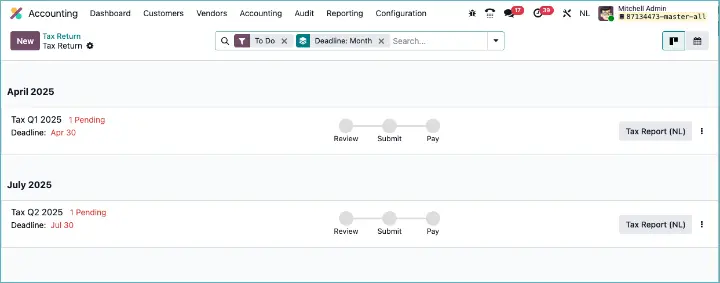
Odoo 19 introduces a new VAT return process: a central place to plan and track tax returns and closings. Deadlines are created automatically, you can see the status per return, and joint returns within a fiscal unit are bundled into one process.
For users, this means more overview and automatic checks that detect errors.
Please note when upgrading
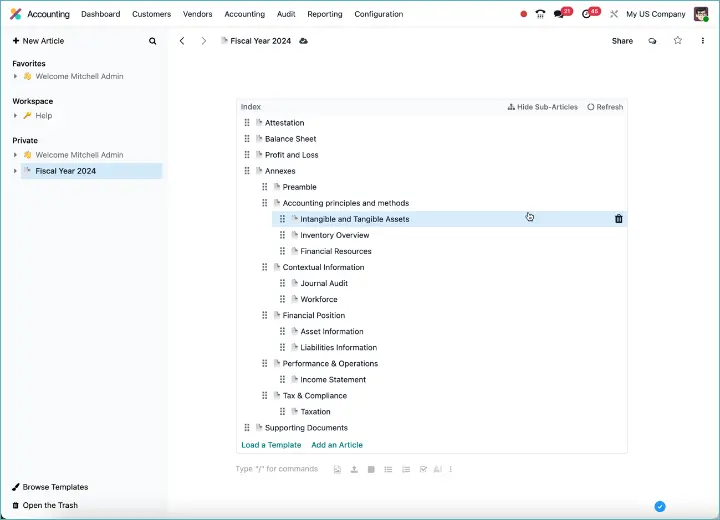
Creating audit reports in the Knowledge app
There is a new link between accounting and knowledge management. You can now create professional audit reports in the Knowledge app, based on accounting data. Useful for accountants and controllers.
Clear status for inactive accounts
The ‘deprecated’ field has been replaced by a standard active/inactive status. This allows you to filter active general ledger accounts more quickly and avoid errors in entries.
Payment reminders contact removed
When following up on outstanding items, Odoo now uses the invoice address by default instead of a separate contact for payment reminders. This simplifies receivables management.
Please note when upgrading
Exclude invoices from payment reminders
Sometimes there are entries that you would prefer not to include in payment reminders. In Odoo 19, that is possible again. The ‘No reminder’ option is back, and for good reason. You can now easily indicate that certain invoices or entries should not be included in follow-up reports, emails or exports.
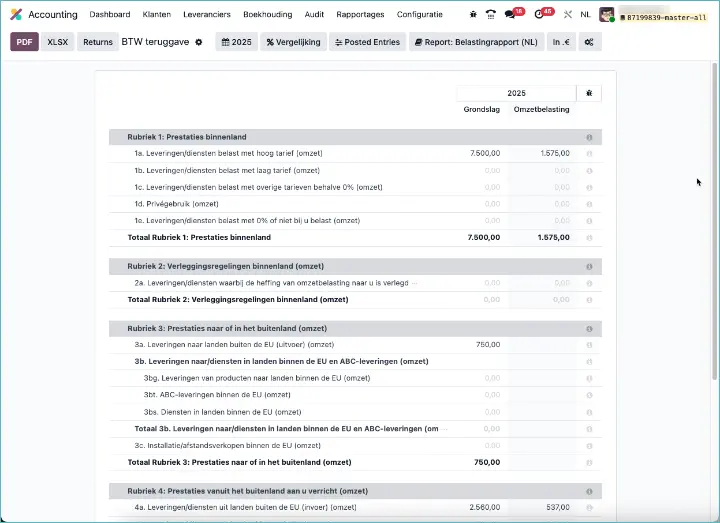
Improved Dutch VAT reports
In Odoo 19, the Dutch VAT report has been refreshed and made clearer. Whereas the old report could sometimes be cluttered and difficult to read, the new version is more compact and clearly structured. This was done by displaying the taxable base amount and the VAT amount on a single line.
Automatic document folders for journals
From Odoo 19 onwards, folders for invoices and bank statements are automatically created and linked to your journals as soon as you install the app Documents & Accounting . This also applies to existing journals: upon installation, they immediately get their own folder and tag.
Synchronization is now enabled by default. Users therefore no longer have to activate it manually, and they also can no longer accidentally disable the automatic linking of documents to journal entries.
Useful detail: the name of the folder and the labels are automatically taken from the journal and translated into the active language. This keeps your document structure tidy and recognizable, even if you work with multiple languages.
Marketing and communication: smarter emailing, better follow-up
Odoo 19 refreshes the way you communicate internally and externally. From better filters and dynamic audience selection to more control over emails and automatic activities.
More control over chatbot settings
The chatbot settings have been expanded. You can now decide for yourself when and how the chatbot is activated, and which responses it gives. This makes the chat experience more personal and better aligned with your target audience.
Manage activities more easily
The filters and actions for activities have been completely redesigned. You can search, group, and follow up more easily. Think of callback requests, follow-up emails, or internal reminders.
Reply all and forward email
The way you can reply to or forward messages now looks more like a regular email client, so you can more quickly see who is being emailed and who is in cc or bcc.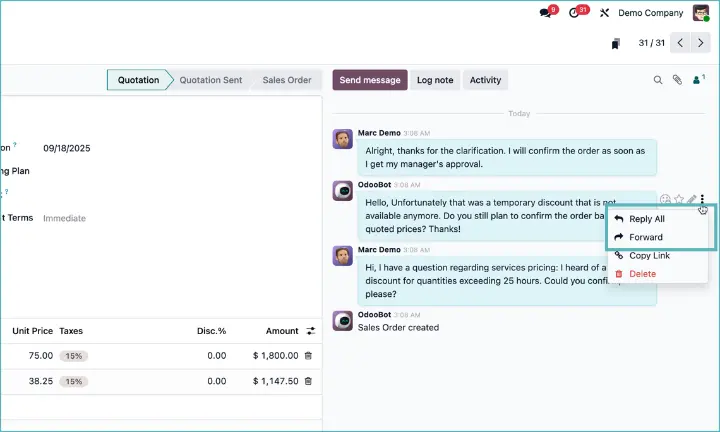
Note when upgrading
Fewer automatic followers
Odoo no longer automatically adds followers to every record. This prevents unnecessary notifications and keeps your inbox more organized.
Note when upgrading
Set up your own outgoing mail server
Users can now set up their own personal outgoing mail server. This is useful for consultants or external users who want to send emails with their own sender address.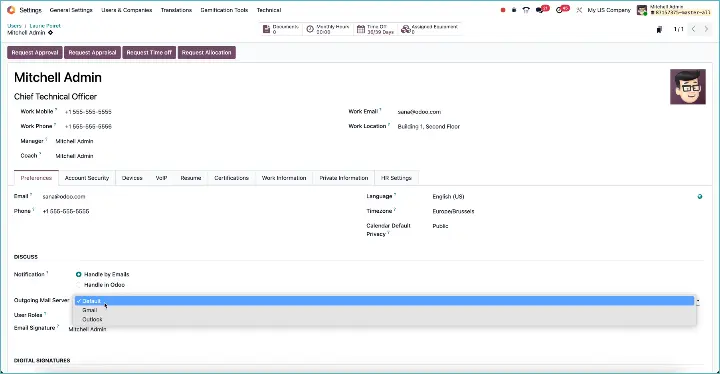
Note when upgrading
Activities completely redesigned
The activity overview has been significantly redesigned, with new views, more buttons, and improved links with other modules. This lets you work faster and see at a glance what needs to be done.
Dynamic audiences in email campaigns
You can now target email campaigns at dynamic audiences based on current filters. This allows you to respond more quickly to behavior and current events, without having to create new lists every time.
WhatsApp for payment reminders
In the follow-up system for outstanding invoices, WhatsApp is now also available as a communication channel. So you can contact customers directly through the app, alongside email or letter.
HR and employees: easier management and better recruiting
Odoo 19 makes HR management a bit easier again. The improvements are small but effective, resulting in clearer processes and fewer manual actions.
New structure for employment contracts
In Odoo 19, the way contracts work has changed significantly. Contracts are no longer separate records, but now exist as versions directly in the employee profile. Every change, such as a new salary or a different role, is recorded as a new version. This automatically creates a clear timeline with the full contract history.
For HR, this means more overview and less hassle. You can see at a glance how someone has developed within the organization.
Time tracking visible in the portal
Employees' timesheets are now more visible to external users via the portal. This is useful for customers who want to check hours or for freelancers who want to review their time records.
Note when upgrading
Talent pool replaces candidate list
In the recruitment module, the traditional candidate overview has been replaced by a modern talent pool. You get better insight into available profiles, even if they have not (yet) directly applied for a position.
Note when upgrading
Expenses without reports
The classic ‘expense reports’ are gone. If no manager is set, expenses are automatically approved and posted. This saves time for small teams and organizations with little hierarchical approval.
Note when upgrading
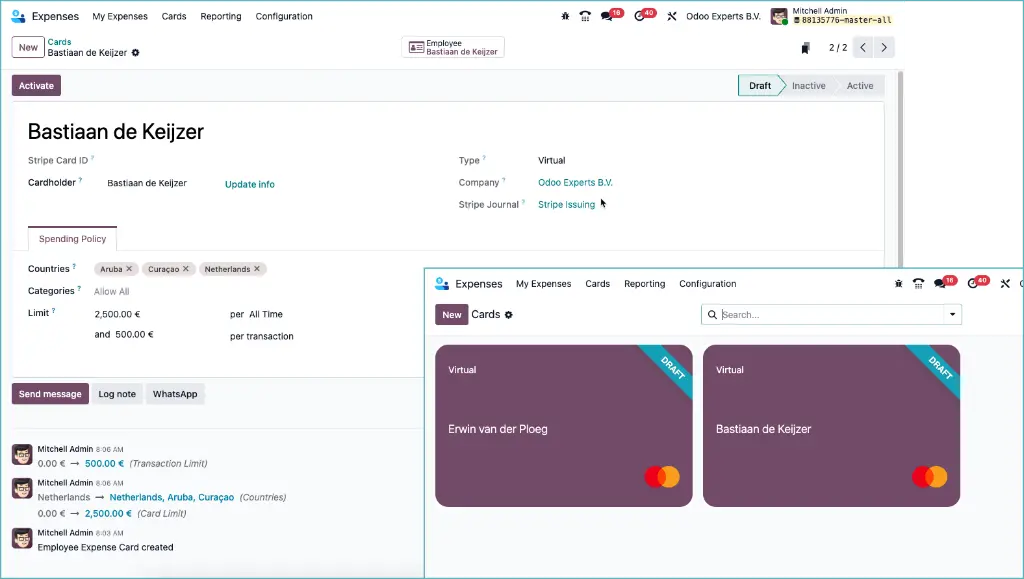
Virtual business payment cards in Odoo
With Odoo 19, you can now manage business payment cards directly from your Odoo environment. Thanks to the new integration with Stripe Issuing, you can create virtual payment cards, assign them to employees, and centrally manage spending limits and categories.
You can define yourself in which countries and categories a card may be used and which limits apply per transaction or in total. Everything works through a direct link with Stripe, which means less manual work and more control over your expenses.
Please note: this feature is currently only available within the EU and for now only works with virtual cards (so no physical cards).
Privacy-friendly clocking in and out: no location or IP required
In some countries, employers are required to record employees' clock-in times, but this may not be combined with registering location or device data. Odoo 19 addresses this with a new privacy setting in the Attendances app.
With the option ‘Track Device and Location Data’, you can now fully decide for yourself whether you want to store browser info, IP addresses, and GPS coordinates when clocking in or out. If you disable this option, then:
- location data is no longer collected at all;
- you will not see any fields with location or device information in the interface;
- all standard attendance tracking functionalities continue to work as usual.
ESG and sustainability: mandatory reporting made easy
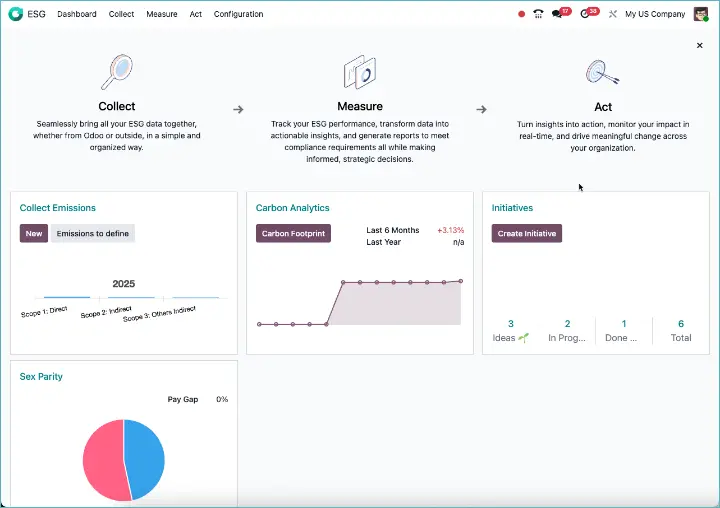
With the arrival of new sustainability legislation, such as the European CSRD, Odoo responds smartly. The new ESG module helps you collect, manage, and report data on environmental, social, and governance matters.
Complete ESG reporting in one app
Odoo introduces a separate module for ESG reporting. In it, you track your CO₂ emissions, which social measures you take, and how your organization is governed. The structure aligns with CSRD requirements, making it easier to comply with your reporting obligations.
Shares & Options: new Shareholder Register in Odoo 19
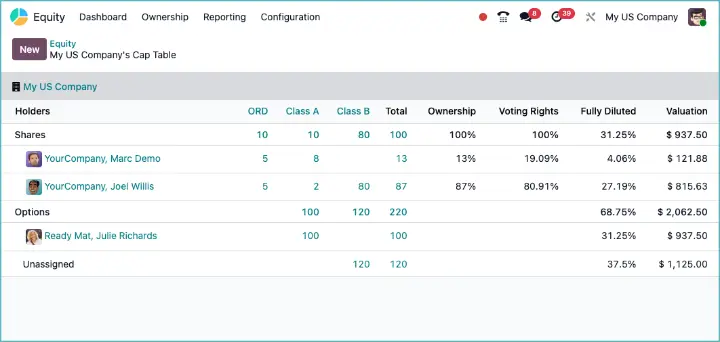
With Odoo 19, Odoo introduces a completely new app: Shares & Options. This lets you easily manage your shares, options, and cap table directly from Odoo. Companies that are used to keeping this kind of information in separate Excel files now finally have an integrated solution.
The app functions as a digital shareholder register. In a single overview, you can see who owns which shares or options, how many have been issued, and which future rights are still outstanding. This makes it much easier for entrepreneurs and finance teams to keep control of the company’s ownership structure.
Documents, knowledge, and e-sign: working smarter with information
Odoo 19 makes it easier to manage documents and share knowledge within your organization. From templates to your own storage: these improvements help you work faster and more efficiently.
Add articles to the template gallery
Users can now add articles themselves to the gallery of templates in the Knowledge app. This makes it easier to save and reuse standard texts, for example for manuals or internal procedures.
Document settings simplified
The configuration of documents has been made clearer. Fewer separate settings, more default options. This allows teams to get started faster with digital file management.
Save attachments in ‘My Drive’
You can now save an attachment directly from a chatter message or task to your personal Drive folder. This keeps important documents within reach, without losing them among message attachments.
Please note when upgrading
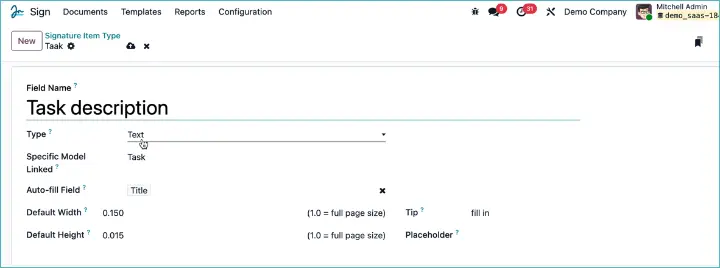
Smarter documents with Odoo Sign
In Odoo 19, you can now have fields filled in automatically in Odoo Sign, directly from any other model. Think of customer data, order numbers, or amounts: as soon as you send a document for signature, these fields are filled in automatically.
This prevents errors caused by manual overwriting, speeds up the process, and ensures your documents are always complete and correct. Useful for contracts, quotations, and any situation where speed and accuracy matter.
Other improvements: small steps, big impact
Some innovations in Odoo 19 do not fit neatly into one category, but they are still very valuable. This release offers useful additions especially for users who work with spreadsheets.
Smarter spreadsheet fields
You can now link columns in spreadsheets via ‘list chaining’. This means you can create references between related fields in a spreadsheet, making analyses more powerful and flexible.
Pivot tables directly from Odoo models
It is now possible to create a pivot table directly from an Odoo model, without first having to set up a separate pivot view. This saves time and makes spreadsheets more accessible for non-technical users.
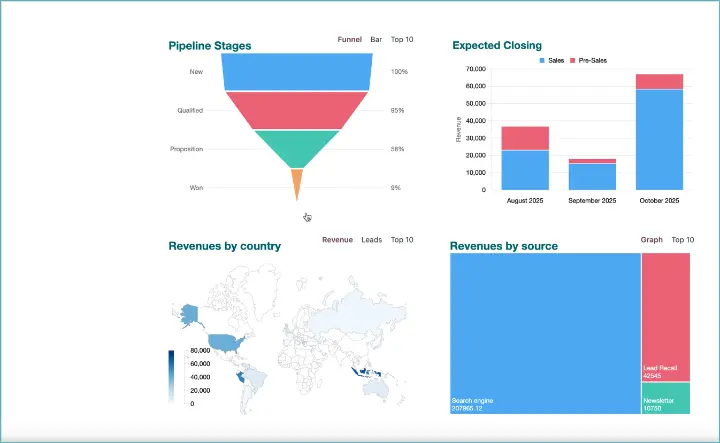
New funnel chart for Odoo data
A new chart type has been added to spreadsheets: the funnel chart. This lets you visualize, for example, the steps in a sales funnel or process flow.
New geo maps in spreadsheets
In Odoo 19, you can now add geo maps to spreadsheets. This lets you display data directly on a world map, with countries automatically colored based on your figures. Useful for visually showing revenue by country or inventory by region, for example.
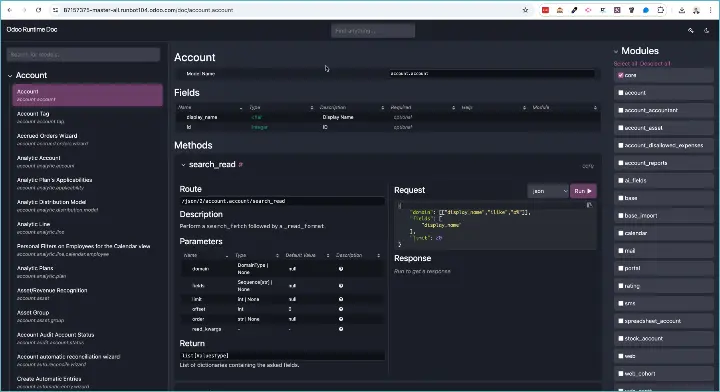
Complete dynamic API documentation
For developers, Odoo 19 includes a useful addition: add /doc to the API URL and you automatically get complete, dynamic documentation of the Odoo API. No separate reference material needed anymore.
With Odoo 19, you get a version that is not only more modern and faster, but also thinks along with you more intelligently. Many small improvements together make a big difference in your daily work. Whether you want more control over your inventory, create quotations faster, or automate administrative tasks, there is always something that improves your processes.
Curious how your company can benefit most from Odoo 19?
Contact Odoo Experts for a personal demo or a migration check. We will show you exactly which new features deliver the most value for you.